
but thanks you are trying






I took dmzx/navbar/styles/prosilver/template/event/overall_header_navigation_prepend.html template and added code at the bottom.HsnCnKly wrote: 8 years ago How can I do like this at simplisity theme. I need to add setforumwidth and readmemberspm extensions. Sorry for my bad english, help, please.
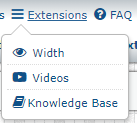
Code: Select all
<!-- IF not S_IS_BOT and S_USER_LOGGED_IN -->
<li id="quick-links" class="quick-links responsive-menu dropdown-container<!-- IF not S_DISPLAY_QUICK_LINKS and not S_DISPLAY_SEARCH --> hidden<!-- ENDIF -->" data-skip-responsive="true">
<a href="#" class="responsive-menu-link dropdown-trigger">
	<i class="icon fa-bars fa-fw" aria-hidden="true"></i><span>{{ lang('NAVBAR_LINKS') }}</span>
</a>
	<div class="dropdown hidden">
		<div class="pointer"><div class="pointer-inner"></div></div>
		<ul class="dropdown-contents" role="menu">
			<!-- EVENT dmzx_navbar_quick_links -->
		</ul>
	</div>
</li>
<!-- ENDIF -->

<li id="extensions-links" class="quick-links responsive-menu dropdown-container" data-skip-responsive="true">
<a href="#" class="responsive-menu-link dropdown-trigger">
	<i class="icon fa-bars fa-fw" aria-hidden="true"></i><span>{{ lang('EXTENSIONS') }}</span>
</a>
	<div class="dropdown hidden">
		<div class="pointer"><div class="pointer-inner"></div></div>
		<ul class="dropdown-contents" role="menu">
			<!-- EVENT dmzx_navbar_extensions -->
		</ul>
	</div>
</li>






Code: Select all
<li id="photo-links" class="quick-links responsive-menu dropdown-container" data-skip-responsive="true">
<a href="#" class="responsive-menu-link dropdown-trigger">
	<i class="icon fa-bars fa-fw" aria-hidden="true"></i><span>{{ lang('PHOTOS') }}</span>
</a>
	<div class="dropdown hidden">
		<div class="pointer"><div class="pointer-inner"></div></div>
		<ul class="dropdown-contents" role="menu">
			<!-- EVENT dmzx_navbar_photos -->
		</ul>
	</div>
</li>But Martin comes in and says it and people get it. WTHSniper_E wrote: 8 years agoThe event template is named overall_header_navigation_prepend.html you can rename that to dmzx_navbar_quick_links.html
This will move your game link into your new "Games" drop down menu.
 and martin , I could not help myself, you are always helpful
 no one read it.





Code: Select all
<li id="extensions-links" class="quick-links responsive-menu dropdown-container" data-skip-responsive="true">
<a href="#" class="responsive-menu-link dropdown-trigger">
	<i class="icon fa-bars fa-fw" aria-hidden="true"></i><span>{{ lang('INCENTIVE WALL') }}</span>
</a>Sniper_E wrote: 8 years agoI took dmzx/navbar/styles/prosilver/template/event/overall_header_navigation_prepend.html template and added code at the bottom.HsnCnKly wrote: 8 years ago How can I do like this at simplisity theme. I need to add setforumwidth and readmemberspm extensions. Sorry for my bad english, help, please.
That created dmzx's Games drop down menu and an Extensions drop down menu.Code: Select all
<!-- IF not S_IS_BOT and S_USER_LOGGED_IN -->
<li id="quick-links" class="quick-links responsive-menu dropdown-container<!-- IF not S_DISPLAY_QUICK_LINKS and not S_DISPLAY_SEARCH --> hidden<!-- ENDIF -->" data-skip-responsive="true">
<a href="#" class="responsive-menu-link dropdown-trigger">
	<i class="icon fa-bars fa-fw" aria-hidden="true"></i><span>{{ lang('NAVBAR_LINKS') }}</span>
</a>
	<div class="dropdown hidden">
		<div class="pointer"><div class="pointer-inner"></div></div>
		<ul class="dropdown-contents" role="menu">
			<!-- EVENT dmzx_navbar_quick_links -->
		</ul>
	</div>
</li>
<!-- ENDIF -->

<li id="extensions-links" class="quick-links responsive-menu dropdown-container" data-skip-responsive="true">
<a href="#" class="responsive-menu-link dropdown-trigger">
	<i class="icon fa-bars fa-fw" aria-hidden="true"></i><span>{{ lang('EXTENSIONS') }}</span>
</a>
	<div class="dropdown hidden">
		<div class="pointer"><div class="pointer-inner"></div></div>
		<ul class="dropdown-contents" role="menu">
			<!-- EVENT dmzx_navbar_extensions -->
		</ul>
	</div>
</li>
Then I renamed all of the event templates in my extension's event/ folder to dmzx_navbar_extensions.html
That's it folks. It does not get any simpler than that.
And I found out that dmzx's code in the <ul class="dropdown-contents-navbar" role="menu"> caused the little space in the drop down.
I changed that line to <ul class="dropdown-contents" role="menu"> and all the links showed up fine.


Look in the language common.php file.weblord wrote: 8 years ago this is exactly what I want . thank you very much.my question is when installed from the start, it came out as Games, how do you change Games into something else?Code: Select all
<li id="extensions-links" class="quick-links responsive-menu dropdown-container" data-skip-responsive="true">
<a href="#" class="responsive-menu-link dropdown-trigger">
	<i class="icon fa-bars fa-fw" aria-hidden="true"></i><span>{{ lang('INCENTIVE WALL') }}</span>
</a>
Sniper_E wrote: 8 years agoI took dmzx/navbar/styles/prosilver/template/event/overall_header_navigation_prepend.html template and added code at the bottom.HsnCnKly wrote: 8 years ago How can I do like this at simplisity theme. I need to add setforumwidth and readmemberspm extensions. Sorry for my bad english, help, please.
That created dmzx's Games drop down menu and an Extensions drop down menu.Code: Select all
<!-- IF not S_IS_BOT and S_USER_LOGGED_IN -->
<li id="quick-links" class="quick-links responsive-menu dropdown-container<!-- IF not S_DISPLAY_QUICK_LINKS and not S_DISPLAY_SEARCH --> hidden<!-- ENDIF -->" data-skip-responsive="true">
<a href="#" class="responsive-menu-link dropdown-trigger">
	<i class="icon fa-bars fa-fw" aria-hidden="true"></i><span>{{ lang('NAVBAR_LINKS') }}</span>
</a>
	<div class="dropdown hidden">
		<div class="pointer"><div class="pointer-inner"></div></div>
		<ul class="dropdown-contents" role="menu">
			<!-- EVENT dmzx_navbar_quick_links -->
		</ul>
	</div>
</li>
<!-- ENDIF -->

<li id="extensions-links" class="quick-links responsive-menu dropdown-container" data-skip-responsive="true">
<a href="#" class="responsive-menu-link dropdown-trigger">
	<i class="icon fa-bars fa-fw" aria-hidden="true"></i><span>{{ lang('EXTENSIONS') }}</span>
</a>
	<div class="dropdown hidden">
		<div class="pointer"><div class="pointer-inner"></div></div>
		<ul class="dropdown-contents" role="menu">
			<!-- EVENT dmzx_navbar_extensions -->
		</ul>
	</div>
</li>
Then I renamed all of the event templates in my extension's event/ folder to dmzx_navbar_extensions.html
That's it folks. It does not get any simpler than that.
And I found out that dmzx's code in the <ul class="dropdown-contents-navbar" role="menu"> caused the little space in the drop down.
I changed that line to <ul class="dropdown-contents" role="menu"> and all the links showed up fine.
Code: Select all
$lang = array_merge($lang, array(
	'INCENTIVE WALL'		=> 'Whatever wall',
));
Look at the bottom of the dmzx/navbar/language/en/common.php
Code: Select all
$lang = array_merge($lang, array(
	'NAVBAR_LINKS'		=> 'Games',
));Code: Select all
$lang = array_merge($lang, array(
	'NAVBAR_LINKS'          => 'Games',
	'EXTENSIONS_LINKS'      => 'Extensions',
));Code: Select all
<i class="icon fa-bars fa-fw" aria-hidden="true"></i><span>{{ lang('EXTENSIONS_LINKS') }}</span>dmzx wrote: 8 years agoLook in the language common.php file.weblord wrote: 8 years ago this is exactly what I want . thank you very much.my question is when installed from the start, it came out as Games, how do you change Games into something else?Code: Select all
<li id="extensions-links" class="quick-links responsive-menu dropdown-container" data-skip-responsive="true">
<a href="#" class="responsive-menu-link dropdown-trigger">
	<i class="icon fa-bars fa-fw" aria-hidden="true"></i><span>{{ lang('INCENTIVE WALL') }}</span>
</a>
Sniper_E wrote: 8 years agoI took dmzx/navbar/styles/prosilver/template/event/overall_header_navigation_prepend.html template and added code at the bottom.HsnCnKly wrote: 8 years ago How can I do like this at simplisity theme. I need to add setforumwidth and readmemberspm extensions. Sorry for my bad english, help, please.
That created dmzx's Games drop down menu and an Extensions drop down menu.Code: Select all
<!-- IF not S_IS_BOT and S_USER_LOGGED_IN -->
<li id="quick-links" class="quick-links responsive-menu dropdown-container<!-- IF not S_DISPLAY_QUICK_LINKS and not S_DISPLAY_SEARCH --> hidden<!-- ENDIF -->" data-skip-responsive="true">
<a href="#" class="responsive-menu-link dropdown-trigger">
	<i class="icon fa-bars fa-fw" aria-hidden="true"></i><span>{{ lang('NAVBAR_LINKS') }}</span>
</a>
	<div class="dropdown hidden">
		<div class="pointer"><div class="pointer-inner"></div></div>
		<ul class="dropdown-contents" role="menu">
			<!-- EVENT dmzx_navbar_quick_links -->
		</ul>
	</div>
</li>
<!-- ENDIF -->

<li id="extensions-links" class="quick-links responsive-menu dropdown-container" data-skip-responsive="true">
<a href="#" class="responsive-menu-link dropdown-trigger">
	<i class="icon fa-bars fa-fw" aria-hidden="true"></i><span>{{ lang('EXTENSIONS') }}</span>
</a>
	<div class="dropdown hidden">
		<div class="pointer"><div class="pointer-inner"></div></div>
		<ul class="dropdown-contents" role="menu">
			<!-- EVENT dmzx_navbar_extensions -->
		</ul>
	</div>
</li>
Then I renamed all of the event templates in my extension's event/ folder to dmzx_navbar_extensions.html
That's it folks. It does not get any simpler than that.
And I found out that dmzx's code in the <ul class="dropdown-contents-navbar" role="menu"> caused the little space in the drop down.
I changed that line to <ul class="dropdown-contents" role="menu"> and all the links showed up fine.
I see that you changed L_NAVBAR_LINKS to lang('INCENTIVE WALL') so change that also in common.php file
Then you can change the language files from games to whaterver you like.
so common.php looks like:
Code: Select all
$lang = array_merge($lang, array(
	'INCENTIVE WALL'		=> 'Whatever wall',
));

Hi guys,Sniper_E wrote: 8 years ago I see why your yahtzee icon is off. That game is using a icon image instead of a fa-icon.You could select a fa-fa icon to use in that code and your icons will line up.Code: Select all
<li class="small-icon icon-knuffel"><a href="/knuffel" title="Yahtzee">Yahtzee</a></li>As far as your links duplicated in the navbar...Code: Select all
			<li data-last-responsive="true">
				<a href="/knuffel" title="Yahtzee" role="menuitem">
				<i class="icon fa fa-yahoo" aria-hidden="true"></i> <span>Yahtzee</span></a>
			</li>
Once you get them in your drop-down then remove the event template like I instructed above.
Code: Select all
<li data-last-responsive="true">
				<a href="/knuffel" title="Radio Live" role="menuitem">
				<i class="icon fa fa-yahoo" aria-hidden="true"></i> <span>Radio Live</span></a>
</li>Code: Select all
<li id="extensions-links" class="quick-links responsive-menu dropdown-container" data-skip-responsive="true">
<a href="#" class="responsive-menu-link dropdown-trigger">
	<i class="icon fa-bars fa-fw" aria-hidden="true"></i><span>{{ lang('Radio Live') }}</span>
</a>Code: Select all
<a href="#" class="responsive-menu-link dropdown-trigger">You just posted this yesterday afternoon. And I am just now seeing your post here this morning.
