3.2 & 3.3 Extensions Database 3.2 / 3.3Delete Inactive Users

<span class="qte-attr qte_32_33-qte">3.2.x & 3.3.x</span>
[phpBB Debug] PHP Warning: in file [ROOT]/vendor/twig/twig/src/Template.php on line 359: Array to string conversion
Array

Topic Author
dmzx Online
Founder
Founder
Status: Online
User theme: Dark
Posts: 6485
Joined: Jan 13th, '14, 20:45
    Windows 10 Chrome

Delete Inactive Users

Post by dmzx »

Extension Name: Delete Inactive Users
Author: dmzx

Special thanks to: martin

Extension Description:
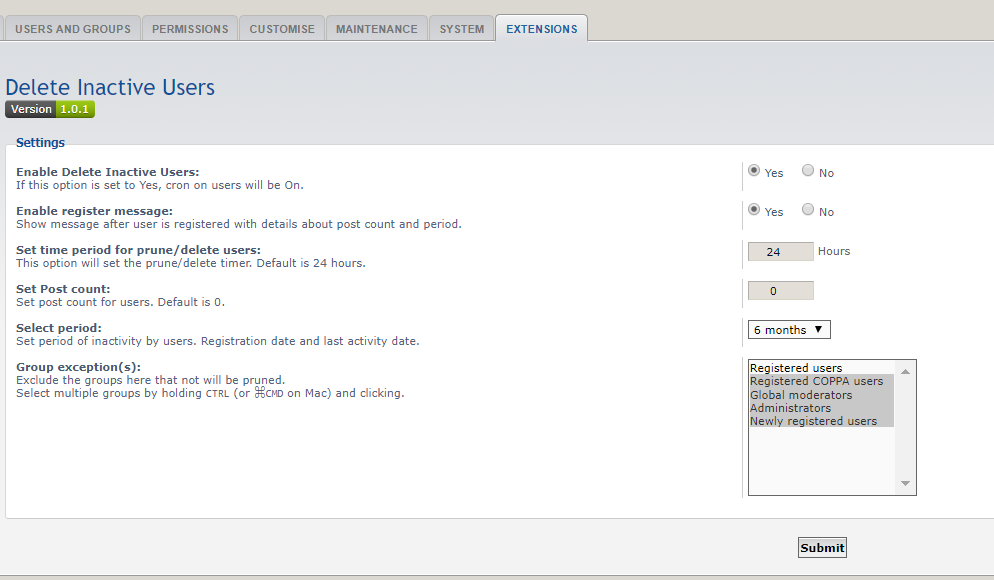
Delete inactive users by cron, can set post count to a value and you can exclude multiple groups.


- Code cleanup.
- Code update.


- Update composer.json
- Code update


- Added admin log for deleted users.
- Added option for email message to deleted users.


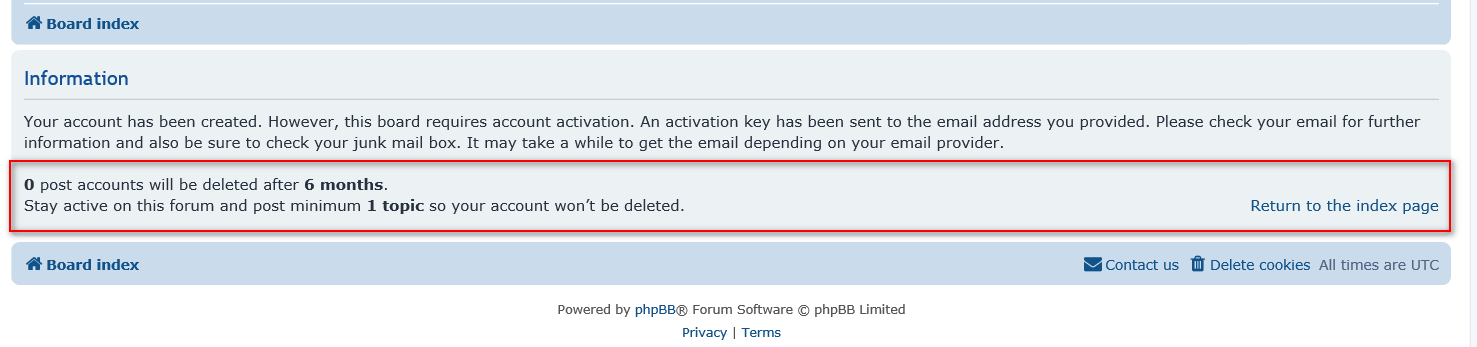
Added option to show message after register user.

Screenshots:
Image

Image

Extension Download:
Download-link
Delete Inactive Users v1.0.4
Installation:
  1. Download the latest release.
  2. Unzip the downloaded release, and change the name of the folder to `deleteinactiveusers`.
  3. In the `ext` directory of your phpBB board, create a new directory named `dmzx` (if it does not already exist).
  4. Copy the `deleteinactiveusers` folder to `/ext/dmzx/` if done correctly, you'll have the main extension class at
    (your forum root)/ext/dmzx/deleteinactiveusers/composer.json
  5. Navigate in the ACP to `Customise -> Manage extensions`
  6. Look for `Delete Inactive Users` under the Disabled Extensions list, and click its `Enable` link.

[phpBB Debug] PHP Warning: in file [ROOT]/vendor/twig/twig/src/Template.php on line 359: Array to string conversion
Array

clight77
Donator
Donator
Status: Offline
User theme: Dark
Posts: 507
Joined: Sep 24th, '15, 14:23
    Windows 10 Chrome

Re: Delete Inactive Users

Post by clight77 »

Thanks dmzx, I will use for sure. :)

[phpBB Debug] PHP Warning: in file [ROOT]/vendor/twig/twig/src/Template.php on line 359: Array to string conversion
Array

clight77
Donator
Donator
Status: Offline
User theme: Dark
Posts: 507
Joined: Sep 24th, '15, 14:23
    Windows 10 Chrome

Re: Delete Inactive Users

Post by clight77 »

1 Question?

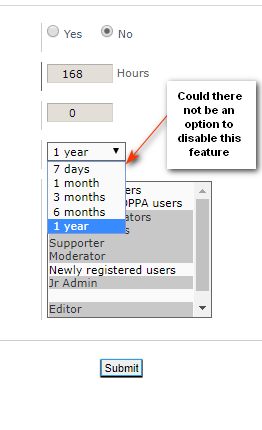
Select period:
Set period of inactivity by users. Registration date and last activity date.

Does this mean even if you have 1 or more posts and you do not come to the board or login for a year no matter what group you get booted?

[phpBB Debug] PHP Warning: in file [ROOT]/vendor/twig/twig/src/Template.php on line 359: Array to string conversion
Array

Topic Author
dmzx Online
Founder
Founder
Status: Online
User theme: Dark
Posts: 6485
Joined: Jan 13th, '14, 20:45
    Windows 10 Chrome

Re: Delete Inactive Users

Post by dmzx »

clight77 wrote: Apr 24th, '19, 11:19 1 Question?

Select period:
Set period of inactivity by users. Registration date and last activity date.

Does this mean even if you have 1 or more posts and you do not come to the board or login for a year no matter what group you get booted?
If you set this period the extension checks if the member is active in this period or registered. The Post count is the important value to set, I have it only on 0 so members that are not active will be deleted after that period.

[phpBB Debug] PHP Warning: in file [ROOT]/vendor/twig/twig/src/Template.php on line 359: Array to string conversion
Array

clight77
Donator
Donator
Status: Offline
User theme: Dark
Posts: 507
Joined: Sep 24th, '15, 14:23
    Windows 10 Chrome

Re: Delete Inactive Users

Post by clight77 »

Maybe?
Or am I overthinking this.. lol


Image

[phpBB Debug] PHP Warning: in file [ROOT]/vendor/twig/twig/src/Template.php on line 359: Array to string conversion
Array

Topic Author
dmzx Online
Founder
Founder
Status: Online
User theme: Dark
Posts: 6485
Joined: Jan 13th, '14, 20:45
    Windows 10 Chrome

Re: Delete Inactive Users

Post by dmzx »

clight77 wrote: Apr 24th, '19, 11:59 Maybe?
Or am I overthinking this.. lol


Image
No, the extension does look at this time, otherwise the post set is also direct for new members that have lately registered to your board.

[phpBB Debug] PHP Warning: in file [ROOT]/vendor/twig/twig/src/Template.php on line 359: Array to string conversion
Array

clight77
Donator
Donator
Status: Offline
User theme: Dark
Posts: 507
Joined: Sep 24th, '15, 14:23
    Windows 10 Chrome

Re: Delete Inactive Users

Post by clight77 »

OK thanks :)

[phpBB Debug] PHP Warning: in file [ROOT]/vendor/twig/twig/src/Template.php on line 359: Array to string conversion
Array

ivailo95
Users
Users
Status: Offline
User theme: Dark
Posts: 919
Joined: Feb 2nd, '18, 11:04
    Windows 7 Opera

Re: Delete Inactive Users

Post by ivailo95 »

So if users are with 0 post their account will be deleted? :roll:
Feed like a disease
And bring them to their knees
They'll pay for their deceit

[phpBB Debug] PHP Warning: in file [ROOT]/vendor/twig/twig/src/Template.php on line 359: Array to string conversion
Array

Topic Author
dmzx Online
Founder
Founder
Status: Online
User theme: Dark
Posts: 6485
Joined: Jan 13th, '14, 20:45
    Windows 10 Chrome

Re: Delete Inactive Users

Post by dmzx »

ivailo95 wrote: Apr 24th, '19, 12:26 so if users are with 0 post their account will be deleted? :roll:
Yes after the period of time is past.
So if a member just register and dont post anything he will be deleted after x period.

[phpBB Debug] PHP Warning: in file [ROOT]/vendor/twig/twig/src/Template.php on line 359: Array to string conversion
Array

Painkiller88
Users
Users
Status: Offline
User theme: Dark
Posts: 63
Joined: Jan 3rd, '19, 23:51
    unknown Mozilla

Re: Delete Inactive Users

Post by Painkiller88 »

Just to be sure:

This just happens to User with 0 posts? So for example a User registers, creates 1 Post and after that he is inactive for lets say 1 Year, his account won't be deleted because he already created 1 post.

Or does it mean 1 post in the last 6 months, 1 year etc..?

Sry i am normally not that dumb :D

[phpBB Debug] PHP Warning: in file [ROOT]/vendor/twig/twig/src/Template.php on line 359: Array to string conversion
Array

Topic Author
dmzx Online
Founder
Founder
Status: Online
User theme: Dark
Posts: 6485
Joined: Jan 13th, '14, 20:45
    Windows 10 Chrome

Re: Delete Inactive Users

Post by dmzx »

Painkiller88 wrote: Apr 24th, '19, 12:32 This just happens to User with 0 posts? So for example a User registers, creates 1 Post and after that he is inactive for lets say 1 Year, his account won't be deleted because he already created 1 post.
Yes when you set 0 above is correct.

[phpBB Debug] PHP Warning: in file [ROOT]/vendor/twig/twig/src/Template.php on line 359: Array to string conversion
Array

Solidjeuh
Users
Users
Status: Offline
User theme: Dark
Posts: 348
Joined: Dec 13th, '14, 01:40
    Windows 10 Firefox

Re: Delete Inactive Users

Post by Solidjeuh »

Great ext! Thank you
Forum voor NL Extensie vertalingen ---> https://www.supportforum.be
----------------------------------------------------------------------------

[phpBB Debug] PHP Warning: in file [ROOT]/vendor/twig/twig/src/Template.php on line 359: Array to string conversion
Array

ivailo95
Users
Users
Status: Offline
User theme: Dark
Posts: 919
Joined: Feb 2nd, '18, 11:04
    Android Chrome

Re: Delete Inactive Users

Post by ivailo95 »

I suggest to create log for this ex i mean when user is delete this action can be show in ACP

[phpBB Debug] PHP Warning: in file [ROOT]/vendor/twig/twig/src/Template.php on line 359: Array to string conversion
Array

martin
Admin
Admin
Status: Offline
User theme: Dark
Posts: 5123
Joined: Apr 6th, '14, 14:12
    Linux Chrome

Re: Delete Inactive Users

Post by martin »

Vip members get the logged version :rolling: freebie users get the junk.
Image

[phpBB Debug] PHP Warning: in file [ROOT]/vendor/twig/twig/src/Template.php on line 359: Array to string conversion
Array

ivailo95
Users
Users
Status: Offline
User theme: Dark
Posts: 919
Joined: Feb 2nd, '18, 11:04
    Android Chrome

Re: Delete Inactive Users

Post by ivailo95 »

So, i set 3 post count, 1 hour and 7 days (today,15.05.2019year)
now who is now made 3 post his account will be deleted after 7 day (on 22.05.2019year) need to be deleted on this date
You do not have the required permissions to view the files attached to this post! Maybe your post count is too low.