3.2.x Extensions Database 3.2 / 3.3Set forum width 3.2.x

<span class="qte-attr qte_32_33-qte">3.2.x & 3.3.x</span>
[phpBB Debug] PHP Warning: in file [ROOT]/vendor/twig/twig/src/Template.php on line 359: Array to string conversion
Array

Topic Author
dmzx
Founder
Founder
Status: Offline
User theme: Dark
Posts: 6488
Joined: Jan 13th, '14, 20:45
    Linux Chrome

Set forum width 3.2.x

Post by dmzx »

Extension Name: Set forum width
Author: dmzx

Special thanks to: martin

Extension Description:
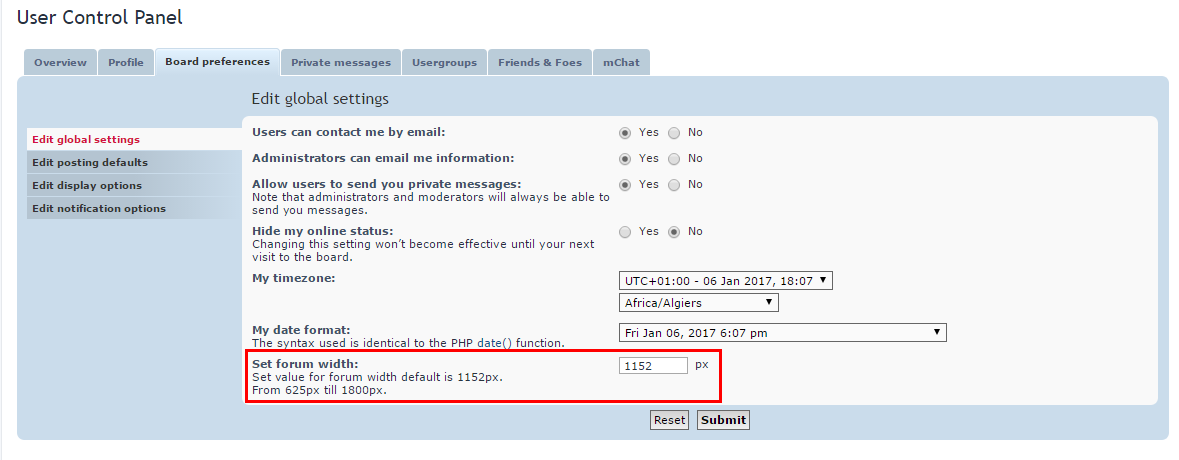
With this extension you can set forum width in ucp in pixels.

dmzx/Set-forum-width


Code update for validation.

Screenshots:
Image

Image

Extension Download:
setforumwidth_v101.zip
Installation:
  1. Download the latest release.
  2. Unzip the downloaded release, and change the name of the folder to `setforumwidth`.
  3. In the `ext` directory of your phpBB board, create a new directory named `dmzx` (if it does not already exist).
  4. Copy the `setforumwidth` folder to `/ext/dmzx/` if done correctly, you'll have the main extension class at
    (your forum root)/ext/dmzx/setforumwidth/composer.json
  5. Navigate in the ACP to `Customise -> Manage extensions`
  6. Look for `Set forum width` under the Disabled Extensions list, and click its `Enable` link.
You do not have the required permissions to view the files attached to this post! Maybe your post count is too low.

[phpBB Debug] PHP Warning: in file [ROOT]/vendor/twig/twig/src/Template.php on line 359: Array to string conversion
Array

infspirit
Translators
Translators
Status: Offline
User theme: Dark
Posts: 25
Joined: Sep 13th, '15, 18:50
    Windows 8.1 Chrome

Re: Set forum width 3.2.x

Post by infspirit »

Translate for spanish
You do not have the required permissions to view the files attached to this post! Maybe your post count is too low.

[phpBB Debug] PHP Warning: in file [ROOT]/vendor/twig/twig/src/Template.php on line 359: Array to string conversion
Array

Scanialady
Users
Users
Status: Offline
User theme: Dark
Posts: 310
Joined: Apr 6th, '15, 16:04
    Windows 10 Chrome

Re: Set forum width 3.2.x

Post by Scanialady »

German language file [DE]

now included in the install package.
Last edited by Scanialady on Mar 1st, '17, 22:06, edited 2 times in total.
-
If you want to get German translations for extensions: ask me.

[phpBB Debug] PHP Warning: in file [ROOT]/vendor/twig/twig/src/Template.php on line 359: Array to string conversion
Array

Topic Author
dmzx
Founder
Founder
Status: Offline
User theme: Dark
Posts: 6488
Joined: Jan 13th, '14, 20:45
    Windows 10 Chrome

Re: Set forum width 3.2.x

Post by dmzx »

First post updated

[phpBB Debug] PHP Warning: in file [ROOT]/vendor/twig/twig/src/Template.php on line 359: Array to string conversion
Array

Topic Author
dmzx
Founder
Founder
Status: Offline
User theme: Dark
Posts: 6488
Joined: Jan 13th, '14, 20:45
    Windows 10 Chrome

Re: Set forum width 3.2.x

Post by dmzx »

Scanialady wrote: Jan 20th, '17, 18:29 German language file [DE]
Is added in download :wink:

[phpBB Debug] PHP Warning: in file [ROOT]/vendor/twig/twig/src/Template.php on line 359: Array to string conversion
Array

Scanialady
Users
Users
Status: Offline
User theme: Dark
Posts: 310
Joined: Apr 6th, '15, 16:04
    Windows 10 Chrome

Re: Set forum width 3.2.x

Post by Scanialady »

Ah yes.. ok. Than I will delete the attachement

[phpBB Debug] PHP Warning: in file [ROOT]/vendor/twig/twig/src/Template.php on line 359: Array to string conversion
Array

Funny
New user
New user
Status: Offline
User theme: Dark
Posts: 126
Joined: Mar 6th, '17, 15:39
    Windows 10 Chrome

Re: Set forum width 3.2.x

Post by Funny »

Hi
An excellent extension

Thank's
mg Funny :eusa_dance:

[phpBB Debug] PHP Warning: in file [ROOT]/vendor/twig/twig/src/Template.php on line 359: Array to string conversion
Array

Tarkonte
Users
Users
Status: Offline
User theme: Dark
Posts: 14
Joined: Mar 5th, '17, 17:18
    Windows 10 Chrome

Re: Set forum width 3.2.x

Post by Tarkonte »

Italian (it) language here.

Code: Select all

<?php
/**
*
* @package phpBB Extension - Set forum width
* @copyright (c) 2017 dmzx - https://www.dmzx-web.net
* @license http://opensource.org/licenses/gpl-2.0.php GNU General Public License v2
*
*/

if (!defined('IN_PHPBB'))
{
	exit;
}

if (empty($lang) || !is_array($lang))
{
	$lang = array();
}

// DEVELOPERS PLEASE NOTE
//
// All language files should use UTF-8 as their encoding and the files must not contain a BOM.
//
// Placeholders can now contain order information, e.g. instead of
// 'Page %s of %s' you can (and should) write 'Page %1$s of %2$s', this allows
// translators to re-order the output of data while ensuring it remains correct
//
// You do not need this where single placeholders are used, e.g. 'Message %d' is fine
// equally where a string contains only two placeholders which are used to wrap text
// in a url you again do not need to specify an order e.g., 'Click %sHERE%s' is fine
//
// Some characters for use
// ’ » “ ” …

$lang = array_merge($lang, array(
	'SET_WIDTH'				=> 'Imposta la larghezza del forum',
	'SET_WIDTH_LINK'		=> 'Larghezza',
	'SET_WIDTH_EXPLAIN'		=> 'Imposta la larghezza del forum. Il valore di default è 1152px.<br />Da 625px a 1800px.',
));

[phpBB Debug] PHP Warning: in file [ROOT]/vendor/twig/twig/src/Template.php on line 359: Array to string conversion
Array

Anders
Users
Users
Status: Offline
User theme: Dark
Posts: 80
Joined: Sep 15th, '15, 06:15
    Linux Firefox

Re: Set forum width 3.2.x

Post by Anders »

Hi!
I have some weird things going on :rolling: i have this theme BLACK
and when i enable extension forum goes left or is this ext just for prosilver?

[phpBB Debug] PHP Warning: in file [ROOT]/vendor/twig/twig/src/Template.php on line 359: Array to string conversion
Array

Sniper_E
VIP
VIP
Status: Offline
User theme: Dark
Posts: 1161
Joined: Oct 14th, '14, 17:01
    Windows 10 Firefox

Re: Set forum width 3.2.x

Post by Sniper_E »

I put black style up at my site and the width worked in black but the forum was to the left of my page like yours.

I had to add margin: auto; in the #wrap - setforumwidth/styles/prosilver/template/event/overall_header_stylesheets_after.html

Code: Select all

#wrap {
	margin: auto;
	max-width: {SET_WIDTH}px; !important;
}
Now the small 625px width forum in black style is centered in the page. The other styles did not have this problem.
Image
No is NEVER an Option and NEVER is the only Option when it comes to Giving Up!™

[phpBB Debug] PHP Warning: in file [ROOT]/vendor/twig/twig/src/Template.php on line 359: Array to string conversion
Array

Anders
Users
Users
Status: Offline
User theme: Dark
Posts: 80
Joined: Sep 15th, '15, 06:15
    Mac OS X iPad

Re: Set forum width 3.2.x

Post by Anders »

Sniper_E wrote: Aug 21st, '17, 01:57 I put black style up at my site and the width worked in black but the forum was to the left of my page like yours.

I had to add margin: auto; in the #wrap - setforumwidth/styles/prosilver/template/event/overall_header_stylesheets_after.html

Code: Select all

#wrap {
	margin: auto;
	max-width: {SET_WIDTH}px; !important;
}
Now the small 625px width forum in black style is centered in the page. The other styles did not have this problem.

You have made My day Sniper_E
Thx

[ Post made via iPad ] Image

[phpBB Debug] PHP Warning: in file [ROOT]/vendor/twig/twig/src/Template.php on line 359: Array to string conversion
Array

miri4ever
Users
Users
Status: Offline
User theme: Dark
Posts: 71
Joined: Jan 22nd, '17, 14:39
    Windows 10 Opera

Re: Set forum width 3.2.x

Post by miri4ever »

Is it possible to add a general width for the forum, even if logged out ? I mean guest users should also having a minimum settings of width. My forum design gets to small after logged out and with this width settings it could be fine adjusted, but first after login. Can the database having an value for visitors for a special setup width ?

[phpBB Debug] PHP Warning: in file [ROOT]/vendor/twig/twig/src/Template.php on line 359: Array to string conversion
Array

Sniper_E
VIP
VIP
Status: Offline
User theme: Dark
Posts: 1161
Joined: Oct 14th, '14, 17:01
    Windows 10 Firefox

Re: Set forum width 3.2.x

Post by Sniper_E »

I don't see why your Guest user couldn't have a width set in their user data. But they wouldn't have any control on changing the width.
And these are not minimum width settings. This extension sets the width to a user's specified setting.

The migration file sets the width for everyone when enabled to 1152px. Your Guests should see your forum at that width.
As admin you could set your Guest's view to let's say 900px with a sql command.

Code: Select all

UPDATE `phpbb_users` SET `user_set_width` = '900' WHERE `phpbb_users`.`user_id` = 1;

[phpBB Debug] PHP Warning: in file [ROOT]/vendor/twig/twig/src/Template.php on line 359: Array to string conversion
Array

martin
Admin
Admin
Status: Offline
User theme: Dark
Posts: 5133
Joined: Apr 6th, '14, 14:12
    Ubuntu Chrome

Re: Set forum width 3.2.x

Post by martin »

With this ext installed all users will have a set width of 1152px with out the ext installed it should also be 1152px (as in prosilver)
Image

[phpBB Debug] PHP Warning: in file [ROOT]/vendor/twig/twig/src/Template.php on line 359: Array to string conversion
Array

olalavui
Users
Users
Status: Offline
User theme: Dark
Posts: 18
Joined: Jun 27th, '17, 20:00
    Windows 7 Chrome

Re: Set forum width 3.2.x

Post by olalavui »

Vietnamese language pack file:

Code: Select all

<?php
/**
*
* @package phpBB Extension - Set forum width
* @copyright (c) 2017 dmzx - https://www.dmzx-web.net
* @license http://opensource.org/licenses/gpl-2.0.php GNU General Public License v2
* Vietnamese language pack <giaminhteam@gmail.com>
*/

if (!defined('IN_PHPBB'))
{
	exit;
}

if (empty($lang) || !is_array($lang))
{
	$lang = array();
}

// DEVELOPERS PLEASE NOTE
//
// All language files should use UTF-8 as their encoding and the files must not contain a BOM.
//
// Placeholders can now contain order information, e.g. instead of
// 'Page %s of %s' you can (and should) write 'Page %1$s of %2$s', this allows
// translators to re-order the output of data while ensuring it remains correct
//
// You do not need this where single placeholders are used, e.g. 'Message %d' is fine
// equally where a string contains only two placeholders which are used to wrap text
// in a url you again do not need to specify an order e.g., 'Click %sHERE%s' is fine
//
// Some characters for use
// ’ » “ ” …

$lang = array_merge($lang, array(
	'SET_WIDTH'				=> 'Cài đặt độ rộng diễn đàn',
	'SET_WIDTH_LINK'		=> 'Chiều rộng',
	'SET_WIDTH_EXPLAIN'		=> 'Thiết lập này giúp bạn cài đặt độ rộng của diễn đàn, mặc định là 1152px.<br />Từ 625px tới 1800px.',
));

Come back phpBB with phpBBVietnam :tumbsyes: