3.2 & 3.3 Extensions Database 3.2 / 3.3Image Upload

<span class="qte-attr qte_32_33-qte">3.2.x & 3.3.x</span>
User avatar

nou nou
Donator
Donator
Posts: 30
Joined: 19 Oct 2017, 05:10
    Windows 10 Firefox

Re: Image Upload

Post by nou nou »

nou nou wrote: 08 Nov 2017, 07:00 I've found an odd behaviour (bug?) with Image Upload 1.0.4 and Board Announcements on phpBB3.2...

When Image Upload is enabled, an announcement made with Board Announcements cannot be dismissed, even though the setting in the ACP allows for it. The little button to do so in the top right of the announcement disappears as soon as Image Upload is enabled. Disable Image Upload and the button comes back.

Conflict?

[ Post made via Android ] Image

Found what's causing the issue. This CSS rule

Code: Select all

.close {
	position: absolute;
	top: 15px;
	right: 35px;
	color: #f1f1f1;
	font-size: 40px;
	font-weight: bold;
	transition: 0.3s;
}
in imageupload.css line 131 is overwriting the close button position.

Any recommendation on how to solve this?

User avatar

Andrzej
Users
Users
Posts: 3
Joined: 16 Oct 2017, 22:32
    Windows 7 Opera

Re: Image Upload

Post by Andrzej »

Is it possible to make a gallery from files uploaded by Image Upload with user name, access rights, etc?

User avatar

Funny
New user
New user
Posts: 126
Joined: 06 Mar 2017, 16:39
    Windows 10 Chrome

Re: Image Upload

Post by Funny »

Hi
Just turn to Martin or Sniper who can help you determined. These are the aces here in the forum :eyes2:

User avatar

kaspir
Users
Users
Posts: 112
Joined: 25 Aug 2016, 12:50
    Windows 7 Firefox

Re: Image Upload

Post by kaspir »

seacoast wrote: 03 Nov 2017, 18:18 How can images be deleted? Can users delete their own images?

Edit: I found the image list in the ACP, but are users able to delete their own images? If not, is this in the works?

Thank you! Nice extension!
Good question. And dido on it being a nice extension!
seacoast wrote: 08 Nov 2017, 11:53 Is there anyway we could make the New Topic Image upload box display only when the user has uploaded images?
Open /ext/dmzx/imageupload/styles/prosilver/template/event/posting_layout_include_panel_body.html

Replace first line with: <!-- IF IMAGEUPLOAD_USE_UPLOAD and .images -->

Save, upload, clear cache.
Image
World of Phaos RPG online is making it's come back! Play free now!
Check out phpBB contributions & extension downloads. :P

User avatar

seacoast
Users
Users
Posts: 159
Joined: 28 Aug 2017, 19:58
    Windows 10 Firefox

Re: Image Upload

Post by seacoast »

Perfect. Thanks!

User avatar

Topic Author
dmzx
Founder
Founder
Posts: 6471
Joined: 13 Jan 2014, 21:45
    Windows 10 Chrome

Re: Image Upload

Post by dmzx »

seacoast wrote: 15 Nov 2017, 14:06 Perfect. Thanks!
:wink:

User avatar

seacoast
Users
Users
Posts: 159
Joined: 28 Aug 2017, 19:58
    Windows 10 Firefox

Re: Image Upload

Post by seacoast »

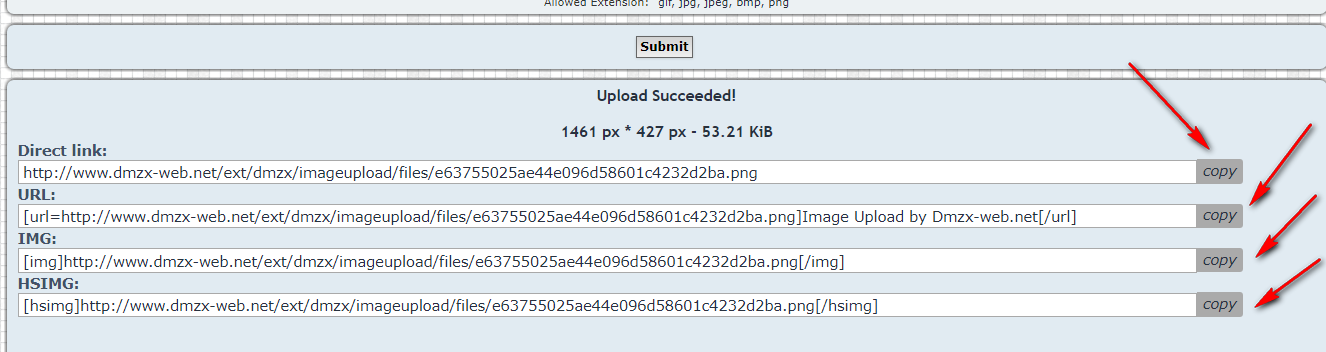
When I drag and drop an image into a post, the image shows as a complete link to the upload. Is that what's supposed to happen?

User avatar

Topic Author
dmzx
Founder
Founder
Posts: 6471
Joined: 13 Jan 2014, 21:45
    Windows 10 Chrome

Re: Image Upload

Post by dmzx »

seacoast wrote: 24 Nov 2017, 14:12 When I drag and drop an image into a post, the image shows as a complete link to the upload. Is that what's supposed to happen?
yes that will happen.
just click the "Copy" icon and paste it into your post.

User avatar

seacoast
Users
Users
Posts: 159
Joined: 28 Aug 2017, 19:58
    Windows 10 Firefox

Re: Image Upload

Post by seacoast »

Hmm...I don't see the "copy" icon...which brings me to the background color of the image box. It's #F9F9F9 but should be #262626 to match my style.

CSS file change?
Thank you.

Edit: Found the bg color in the .css. Easy fix.
Last edited by seacoast on 24 Nov 2017, 14:27, edited 1 time in total.

User avatar

Topic Author
dmzx
Founder
Founder
Posts: 6471
Joined: 13 Jan 2014, 21:45
    Windows 10 Chrome

Re: Image Upload

Post by dmzx »

seacoast wrote: 24 Nov 2017, 14:21 Hmm...I don't see the "copy" icon...which brings me to the background color of the image box. It's #F9F9F9 but should be #262626 to match my style.

CSS file change?
Thank you.
See this when you upload an image.

Image

:thumbup:

User avatar

seacoast
Users
Users
Posts: 159
Joined: 28 Aug 2017, 19:58
    Windows 10 Firefox

Re: Image Upload

Post by seacoast »

Oh yes I saw those copy buttons. I was thinking there should be one in the image list box. Perhaps it should default to the IMG bbcode when dragged/dropped? Already pre-wrapped.
Just a suggestion. :D

User avatar

claudioprv
Users
Users
Posts: 1
Joined: 17 Jun 2017, 02:08
    Windows 10 Chrome

Re: Image Upload

Post by claudioprv »

Sorry for my english my native language is portuguese.

Hello everyone I had a little problem with this wonderful extension, this extension always writes the pictures with 0600 permission so it does not work the images will not show up because it has to be 0644 so I found out that there is an error in the script that I solved as follows , maybe it will settle for other people here as well.
The script tries to change the permission of the file that no longer exists, so it does not work.

https://github.com/dmzx/Image-Upload/bl ... #L210-L211

change
@chmod($this->ext_path_web . 'files/' . $upload_file->get('uploadname'), 0644);
to
chmod($upload_dir . $upload_file->get('realname'), 0644);

User avatar

JohnDory
Donator
Donator
Posts: 20
Joined: 01 Apr 2015, 01:11
    Windows 10 Firefox

Re: Image Upload

Post by JohnDory »

How can I change the directory the files are uploaded to ?
Cheers.

Mike.

User avatar

Posey
Users
Users
Posts: 84
Joined: 20 Oct 2015, 11:43
    Windows 10 Chrome

Re: Image Upload

Post by Posey »

JohnDory wrote: 22 Feb 2018, 01:25 how can I change the directory the files are uploaded to ?
You can not.
It's hardcoded in.

Unless you are willing to hardcode changes to the extension, it's not possible.
And even then, every time the extension gets updated, you will have to reapply the changes.
''I'm pretty sure there's a lot more to life than being really, really, ridiculously good looking.
And I plan on finding out what that is.''

posey

User avatar

JohnDory
Donator
Donator
Posts: 20
Joined: 01 Apr 2015, 01:11
    Windows 10 Firefox

Re: Image Upload

Post by JohnDory »

Posey wrote: 22 Feb 2018, 01:33
JohnDory wrote: 22 Feb 2018, 01:25 how can I change the directory the files are uploaded to ?
Unless you are willing to hardcode changes to the extension, it's not possible.
And even then, every time the extension gets updated, you will have to reapply the changes.
I could do that if I knew what to change.

Post Reply Previous topicNext topic