
<span class="qte-attr qte_32_33-qte">3.2.x & 3.3.x</span>
dmzx Online
Founder
Status:
Online
User theme: Dark
Posts: 6491 Joined: Jan 13th, '14, 20:45
Post
by dmzx » Feb 26th, '21, 11:51
Extension Name: Topic Image
Author: dmzx &
martin
Special thanks to: clight77 for making this development possible.
Extension Description:
Topic image on index extension.
dmzx/Topic-Image
- Added WebP case.
- Code update.
- Added title to images option and colour option.
- Added width selection in APC.

- Added limit for images in topics.
- Added Cron for deleting and grabbing images.
- Code updates.
Screenshots:

Extension Download:
Installation:
Download the latest release.
Unzip the downloaded release, and change the name of the folder to `topicimage `.
In the `ext ` directory of your phpBB board, create a new directory named `dmzx ` (if it does not already exist).
Copy the `topicimage ` folder to `/ext/dmzx/ ` if done correctly, you'll have the main extension class at
(your forum root)/ext/dmzx/topicimage/composer.json
Navigate in the ACP to `Customise -> Manage extensions`
Look for `Topic Image ` under the Disabled Extensions list, and click its `Enable ` link.
dmzx Online
Founder
Status:
Online
User theme: Dark
Posts: 6491 Joined: Jan 13th, '14, 20:45
Post
by dmzx » Feb 26th, '21, 11:51
First post taken....
clight77
Donator
Status:
Offline
User theme: Dark
Posts: 508 Joined: Sep 24th, '15, 14:23
Post
by clight77 » Feb 26th, '21, 15:10
Thanks, I like it :)
Suits my site :)
clight77
Donator
Status:
Offline
User theme: Dark
Posts: 508 Joined: Sep 24th, '15, 14:23
Post
by clight77 » Feb 27th, '21, 16:17
Just a suggestion.
I think ext could have a auto prune function in ACP for the oldest as it seems after 1000 - 1500 images site tends to slow down.
Possible to do ?
Cheers :
Hamidouki-dz
Users
Status:
Offline
User theme: Dark
Posts: 164 Joined: Sep 1st, '18, 09:26
Post
by Hamidouki-dz » Mar 3rd, '21, 08:13
Hello
does the extension function on phpbb version 3.2.7
Thanks
Sniper_E
VIP
Status:
Offline
User theme: Dark
Posts: 1161 Joined: Oct 14th, '14, 17:01
Post
by Sniper_E » Mar 3rd, '21, 08:32
clight77 wrote: Feb 27th, '21, 16:17 Just a suggestion.
Sniper_E wrote: Feb 27th, '21, 16:38 Just a suggestion.
You should update your phpbb version 3.2.7 to 3.3.3
No is NEVER an Option and NEVER is the only Option when it comes to Giving Up!™
dmzx Online
Founder
Status:
Online
User theme: Dark
Posts: 6491 Joined: Jan 13th, '14, 20:45
Post
by dmzx » Mar 3rd, '21, 08:34
Hamidouki-dz wrote: Mar 3rd, '21, 08:13
Hello
does the extension function on phpbb version 3.2.7
Thanks
No only: PHPBB_VERSION, '3.3.0', '>='
Hamidouki-dz
Users
Status:
Offline
User theme: Dark
Posts: 164 Joined: Sep 1st, '18, 09:26
Post
by Hamidouki-dz » Mar 3rd, '21, 09:54
I have a lot of html code on my forum, and it is difficult to update it otherwise I will have a lot of problems fixing the errors.
martin
Admin
Status:
Offline
User theme: Dark
Posts: 5134 Joined: Apr 6th, '14, 14:12
Post
by martin » Mar 3rd, '21, 12:38
Then you just learnt a lesson dont edit core files.
Sniper_E
VIP
Status:
Offline
User theme: Dark
Posts: 1161 Joined: Oct 14th, '14, 17:01
Post
by Sniper_E » Mar 3rd, '21, 13:57
Dm has an extension that will allow you to make those core edits, then you can do phpbb updates and still have your ext core edits.
faroud
Users
Status:
Offline
User theme: Dark
Posts: 141 Joined: Jul 11th, '15, 09:08
Post
by faroud » Mar 3rd, '21, 17:57
How does that work?
I uploaded it and turned it on
but don't see anything?
clight77
Donator
Status:
Offline
User theme: Dark
Posts: 508 Joined: Sep 24th, '15, 14:23
Post
by clight77 » Mar 3rd, '21, 18:30
faroud wrote: Mar 3rd, '21, 17:57
how does that work?
I uploaded it and turned it on
but don't see anything?
click on a forum or 2 that contains images then they should show, select forums in ACP Image Topic 1st.
dmzx Online
Founder
Status:
Online
User theme: Dark
Posts: 6491 Joined: Jan 13th, '14, 20:45
Post
by dmzx » Mar 3rd, '21, 20:07
I will post a how to use soon for this.
martin
Admin
Status:
Offline
User theme: Dark
Posts: 5134 Joined: Apr 6th, '14, 14:12
Post
by martin » Mar 3rd, '21, 20:12
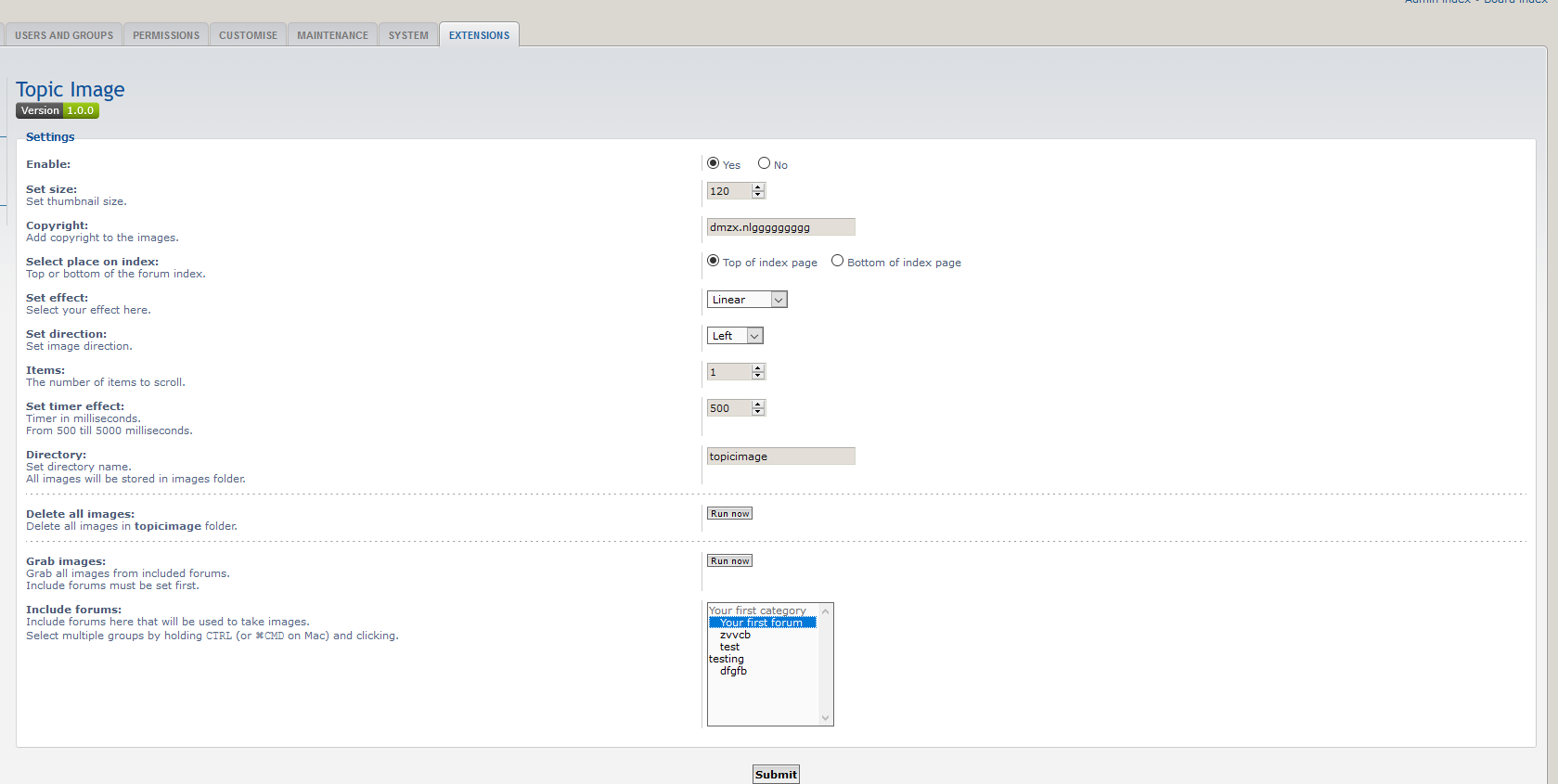
Select the forums you want to get images from and then click on grab now button.
You can also set group permissions to grab images this will update images also as members surf your board.
Note it only works on img tags not attachments.
Screenshot from 2021-03-03 20-09-11.png
Screenshot from 2021-03-03 20-12-16.png
You do not have the required permissions to view the files attached to this post! Maybe your post count is too low.
umi
Users
Status:
Offline
User theme: Dark
Posts: 89 Joined: Aug 5th, '19, 12:18
Post
by umi » Mar 3rd, '21, 22:28
You do not have the required permissions to view the files attached to this post! Maybe your post count is too low.