I dont mean to be OT here but where did you get this for 3.1.x? Would love to have it for 3.1.x Not yet ready to update to 3.2.x yet.
3.2.x Extensions Database 3.2 / 3.3 ⇒ Form Maker/Creator 3.2.x
-
 Hippie459MN
- Donator

- Posts: 69
- Joined: 16 Aug 2015, 08:37


Re: Form Maker/Creator 3.2.x
"I went outside once. The graphics sucked but the game play was ok."
-
 Tarkonte
- Users

- Posts: 14
- Joined: 05 Mar 2017, 18:18
-
Re: Form Maker/Creator 3.2.x
Nice job, folks!
Now a question.
Could it be possible to integrate in a future release a couple of functionalities such as:
Please let me know if I can help you in some way or if you could lead me in a temptative alternate extension development.
Thank you in advance.
Now a question.
Could it be possible to integrate in a future release a couple of functionalities such as:
- the capability to save in a new table (form_data) all the data filled in form
- the capability to retrieve form data from DB instead of parsing the first post
- the db design functions to integrate the form design
Please let me know if I can help you in some way or if you could lead me in a temptative alternate extension development.
Thank you in advance.
-
 dmzx Online
- Founder

- Posts: 6493
- Joined: 13 Jan 2014, 21:45


Re: Form Maker/Creator 3.2.x
Need to check on this, for making extensions see also https://github.com/phpbb-extensions/phpbb-ext-skeleton it will give default files for a start.
-
Tarkonte
- Users
- Posts: 14
- Joined: 05 Mar 2017, 18:18
-
Re: Form Maker/Creator 3.2.x
Here is attached the italian translation language (it) for the current release (1.0.0-dev).
unzip the file in the ext\dmzx\formcreator\language subfolder
In allegato la traduzione in italiano del pannello di controllo di Form Maker 1.0.0-dev.
Decomprimere lo zip all'interno della cartella ext\dmzx\formcreator\language.
@dmzx: please feel free to include the it language in the distribution package.
unzip the file in the ext\dmzx\formcreator\language subfolder
In allegato la traduzione in italiano del pannello di controllo di Form Maker 1.0.0-dev.
Decomprimere lo zip all'interno della cartella ext\dmzx\formcreator\language.
@dmzx: please feel free to include the it language in the distribution package.
You do not have the required permissions to view the files attached to this post! Maybe your post count is too low.
Last edited by Tarkonte on 19 Apr 2017, 14:56, edited 1 time in total.
-
Tarkonte
- Users
- Posts: 14
- Joined: 05 Mar 2017, 18:18
-
Re: Form Maker/Creator 3.2.x
Hi dmzx!
Found an error I tried to fix myself.
PHP 7.0.16
PHP 7.0.10
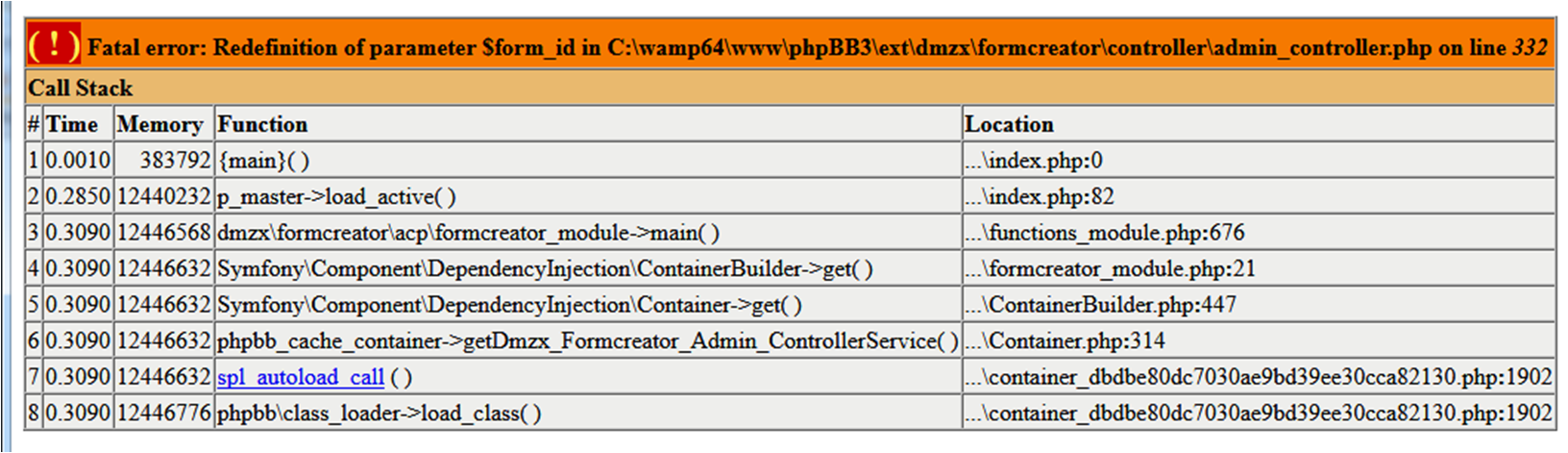
PHP 5.6.25
No error!!!! It's running with flying colours!!!
I tried to fix it succesfully as follows:
Checked against PHP 5.6.25, 7.0.10 & 7.0.16, in ACP creating and updating forms, and in new topic posting.
Found another error/strange behaviour:
When posting a new message with form fields, if the field is chosen from a selection box and it is not mandatory, the field box in the topic doesn't be populated with the relative value input.
The workaroud was to set all those fields as mandatory.
The same happens with checkboxes if the field values in options contain spaces (maybe!!!)
Thnk you for your support.
Found an error I tried to fix myself.
PHP 7.0.16
Code: Select all
Fatal error: Redefinition of parameter $form_id in C:\wamp64\www\phpBB3\ext\dmzx\formcreator\controller\admin_controller.php on line 332PHP 5.6.25
No error!!!! It's running with flying colours!!!
I tried to fix it succesfully as follows:
Find
Code: Select all
function build_preview($form_id, $form_id)Replace with
Code: Select all
function build_preview($form_id)Found another error/strange behaviour:
When posting a new message with form fields, if the field is chosen from a selection box and it is not mandatory, the field box in the topic doesn't be populated with the relative value input.
The workaroud was to set all those fields as mandatory.
The same happens with checkboxes if the field values in options contain spaces (maybe!!!)
Thnk you for your support.
-
nickym0162
- Users

- Posts: 4
- Joined: 03 Apr 2017, 17:08
-
Re: Form Maker/Creator 3.2.x
I installed extension, after that i purge the cache, go to extensions menu open Form creator and i get blank screen ?
-
Tarkonte
- Users
- Posts: 14
- Joined: 05 Mar 2017, 18:18
-
Re: Form Maker/Creator 3.2.x
Probably you are using a default language different from english.nickym0162 wrote: 04 Apr 2017, 15:36 I installed extension, after that i purge the cache, go to extensions menu open Form creator and i get blank screen ?
Copy subdir from ext/dmzx/formcreator/language/en to ext/dmzx/formcreator/language/[yourlanguage]
I solved in this way.
-
nickym0162
- Users
- Posts: 4
- Joined: 03 Apr 2017, 17:08
-
Re: Form Maker/Creator 3.2.x
Already did but nothing
-
nickym0162
- Users
- Posts: 4
- Joined: 03 Apr 2017, 17:08
-
Re: Form Maker/Creator 3.2.x
Hmm it works when i change my php to 5...
How can i fix it that it is working in PHP 7
How can i fix it that it is working in PHP 7
-
Hippie459MN
- Donator
- Posts: 69
- Joined: 16 Aug 2015, 08:37
-
Re: Form Maker/Creator 3.2.x
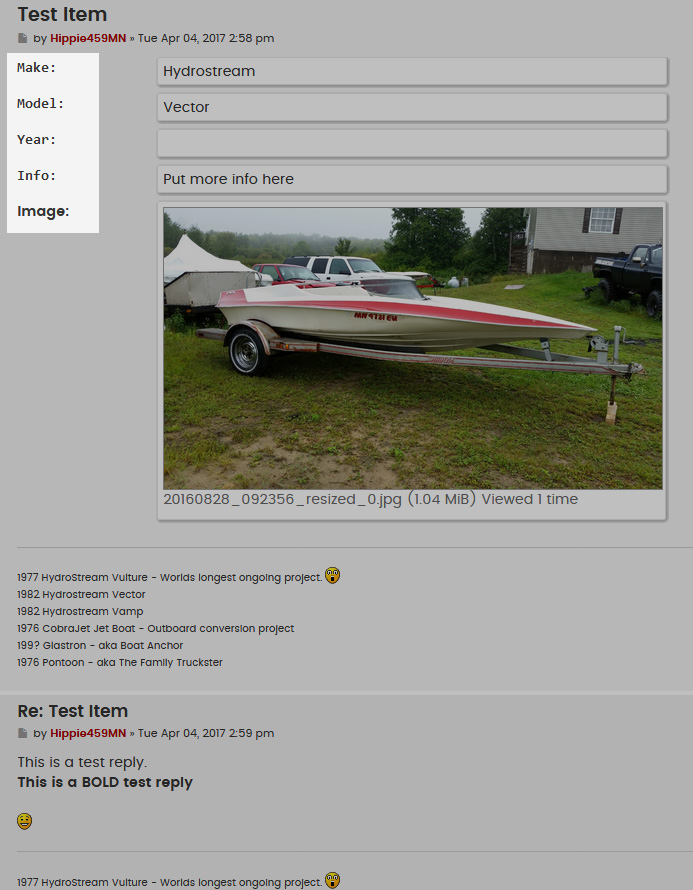
Few problems with the extension. First it the text formatting. Some of the text is the default style text (Images in this example) when a form is created, some is a blocky ugly font/style that doesnt match any styles text.
Before:
After:
Looks much better!
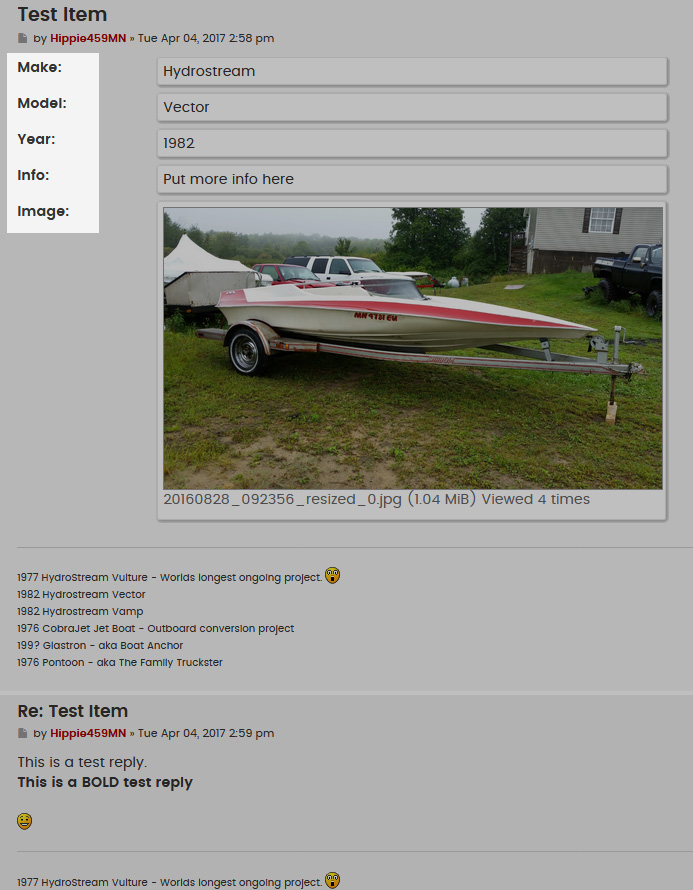
I just edited the bbcode for the 'form'
Under the "HTML replacement" I changed the <pre>{TEXT}</pre> to just {TEXT}
I know its not really the best way to do it but it works and for some reason in the formcreator.css file, I removed the font-family line for .pre and even tried to change it to something else and it would not change the font, I even purged the cache and refreshed my browser with no luck so I did it with the bbcode.
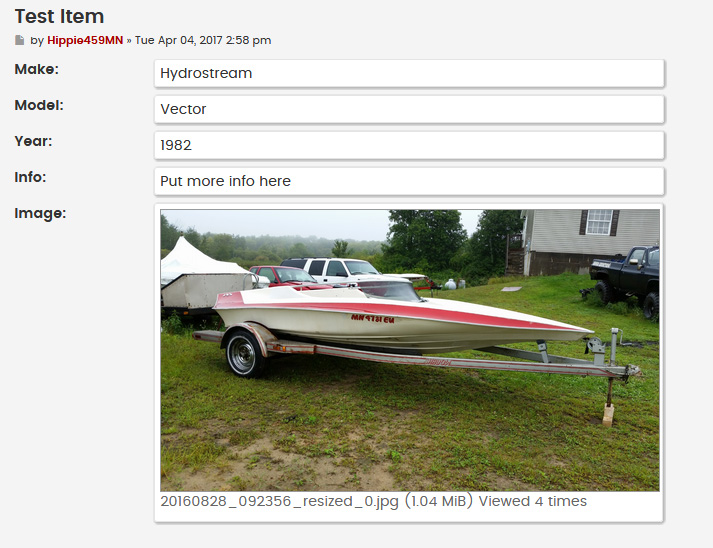
Also, this does not play nicely with the Lighbox Extension (https://www.phpbb.com/customise/db/extension/lightbox/).
With the lightbox extension disabled:
With the Lightbox extension enabled:
It is resizing the image for the lightbox settings as the original image is 1920x1080 and I have the lightbox setting set to 700px and larger to resize.
Is there an easy way to fix this so the two dont conflict?
Thanks. :)
Before:
After:
Looks much better!
I just edited the bbcode for the 'form'
Under the "HTML replacement" I changed the <pre>{TEXT}</pre> to just {TEXT}
I know its not really the best way to do it but it works and for some reason in the formcreator.css file, I removed the font-family line for .pre and even tried to change it to something else and it would not change the font, I even purged the cache and refreshed my browser with no luck so I did it with the bbcode.
Also, this does not play nicely with the Lighbox Extension (https://www.phpbb.com/customise/db/extension/lightbox/).
With the lightbox extension disabled:
With the Lightbox extension enabled:
It is resizing the image for the lightbox settings as the original image is 1920x1080 and I have the lightbox setting set to 700px and larger to resize.
Is there an easy way to fix this so the two dont conflict?
Thanks. :)
-
Tarkonte
- Users
- Posts: 14
- Joined: 05 Mar 2017, 18:18
-
Re: Form Maker/Creator 3.2.x
Look at my previous post, in which I suggest a code modification.nickym0162 wrote: 04 Apr 2017, 16:28 Hmm it works when i change my php to 5...
How can i fix it that it is working in PHP 7
It worked for me, either in PHP 5.6, 7.0.x and 7.1.x.
Hope this can help.
-
PepeFJR
- Users
- Posts: 14
- Joined: 21 Mar 2017, 16:18

Re: Form Maker/Creator 3.2.x
Dmzx, why the Form button doesn't appear with the second post?
-
dmzx Online
- Founder
- Posts: 6493
- Joined: 13 Jan 2014, 21:45
-
Re: Form Maker/Creator 3.2.x
This is normal.
The button only show in first post and after that no more. (look also when you reply a post its gone)
-
PepeFJR
- Users
- Posts: 14
- Joined: 21 Mar 2017, 16:18
-

Re: Form Maker/Creator 3.2.x
Ok, thanks. But to have a Form only for the first post I think it's pretty useless...
[ Post made via iPad ]
