Yes I think abbc3 1.3.1 did not have his EVENT in place before the custom bbcodes. He added that later.Puchahawa wrote: 16 Sep 2016, 22:25 One thing I noticed playing with this is, the button doesn't show up if abbc3 is version 3.1.1. I had one test board that was fresh install running abbc3 3.1.3 and it went fine. Tried on the other out of curiosity and no show. Upgraded abbc3 to 3.1.3 and wala there it is
3.1.x Extensions Database 3.1 / 3.2 ⇒ [RC] Tables bbCode
-
 Sniper_E
- VIP

- Posts: 1160
- Joined: 14 Oct 2014, 19:01


Re: Tables bbCodes

No is NEVER an Option and NEVER is the only Option when it comes to Giving Up!™
-
 Puchahawa
- Users

- Posts: 193
- Joined: 20 Jun 2015, 17:58


Re: Tables bbCodes
That would explain it. Only took me about 45 minutes to figure out the abbc3 version was the culprit.
-
Sniper_E
- VIP
- Posts: 1160
- Joined: 14 Oct 2014, 19:01
-
Re: Tables bbCodes
Not that it matters anymore but this was the fix. https://www.phpbb.com/customise/db/exte ... 41#p455741
-
 proavia
- Users

- Posts: 65
- Joined: 30 Aug 2015, 22:50
-

Re: Tables bbCodes
Hi Sniper
I finally had time to mess with the background colors I asked about a couple days ago.
Thanks for the insight and the extension!
I added bg4 and bg5 classes at the end of sniper\tables\styles\all\theme\tables.css - success!
AFTER:
ADDED:
Is there an easy way to remove the border or make it transparent (only in a post)?
Is there an easy way to center the entire table in a post? Let's say I wanted the table to be 70% of the width of the message area and centered.
Thanks again
I finally had time to mess with the background colors I asked about a couple days ago.
Thanks for the insight and the extension!
At first I attempted the BBCode usage edits - without success. So.......Sniper_E wrote: 15 Sep 2016, 08:37 Yes you can add bg4 and bg5 classes in the tables.css file if you want. It will work there without messing with the colours.css
You could adjust the bbcodes in this copy to make it work like the old one. The [td] can have the class and the [th] can not.
BBCode usage [td={NUMBER}]{TEXT}[/td] HTML replacement <td style="background: #{NUMBER}">{TEXT}</td>
BBCode usage [tr]{TEXT}[/tr] HTML replacement <tr>{TEXT}</tr>
Then your [td=] will control the background color using [td=AA0000] to make the background red.
I would have to look at the old one from January to see how it was put together to make this one work that way.
Grab the new copy and see if you can adjust the bbcodes to work the way you want it. I'll help you out with that.
I added bg4 and bg5 classes at the end of sniper\tables\styles\all\theme\tables.css - success!
AFTER:
Code: Select all
/* Chrome, Safari, IE and Responsive*/
@media screen and (-webkit-min-device-pixel-ratio:0) and (max-width: 700px) {
	.table-button {
		padding: 0 6px;
		height: 12px;
		width: 22px;
		margin: 0 0;
	}

	.tables:hover .table-selections {
		height: 143px;
		width: 87px;
		margin-left: -22px;
	}
}
Code: Select all
.bg4 {
	background-color: #cd5200;
}

.bg5 {
	background-color: #ffff00;
}
Is there an easy way to center the entire table in a post? Let's say I wanted the table to be 70% of the width of the message area and centered.
Thanks again
-
Sniper_E
- VIP
- Posts: 1160
- Joined: 14 Oct 2014, 19:01
-
Re: Tables bbCodes
Your table bbcodeIs there an easy way to center the entire table in a post?
BBCode usage [table={NUMBER} {SIMPLETEXT}]{TEXT}[/table]
HTML replacement <div class="forumbg forumbg-table {SIMPLETEXT}" style="width: {NUMBER}%"><div class="inner"><table class="table1">{TEXT}</table></div></div>
Your tables.css
Code: Select all
.bg4 {
	background-color: #cd5200;
}

.bg5 {
	background-color: #ffff00;
}

.tcenter {
	margin: 6px auto;
}

.tright {
	float:right;
	margin-left: 6px;
}

.tleft {
	float:left;
	margin-right: 6px;
}Code: Select all
[size=130]Table Title[/size][table=65 tcenter][thead]
Last edited by Sniper_E on 18 Sep 2016, 07:14, edited 4 times in total.
-
Sniper_E
- VIP
- Posts: 1160
- Joined: 14 Oct 2014, 19:01
-
Re: Tables bbCodes
What borders? There are no borders in this prosilver tables.Is there an easy way to remove the border or make it transparent (only in a post)?
-
proavia
- Users
- Posts: 65
- Joined: 30 Aug 2015, 22:50

Re: Tables bbCodes
Thanks for info on how to set entire table justification.
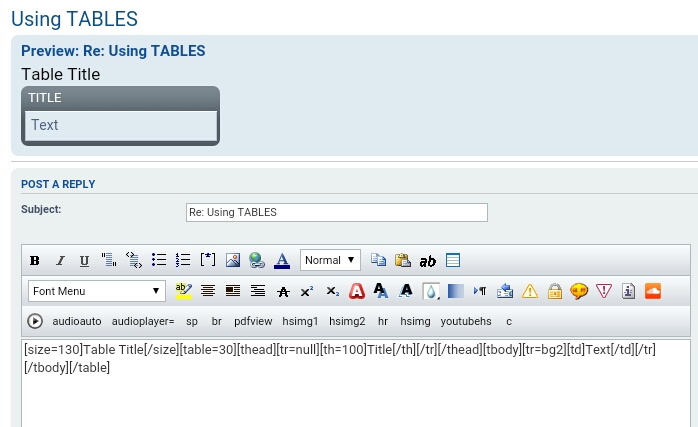
As for the border - the dark gray line around the table. I believe it's the same color as the background in the table header. If it makes any difference, I'm using prosilver_SE.
[ Post made via Android ]
As for the border - the dark gray line around the table. I believe it's the same color as the background in the table header. If it makes any difference, I'm using prosilver_SE.
[ Post made via Android ]
Last edited by proavia on 17 Sep 2016, 07:34, edited 1 time in total.
-
Sniper_E
- VIP
- Posts: 1160
- Joined: 14 Oct 2014, 19:01
-
Re: Tables bbCodes
Goto your prosilver_SE memberlist page and look at the table the members are in. These tables pick up the classes from any prosilver type that their memberlist page tables pick up. Each style has a different color or background image on their table. This is style dependent so it should match your style's memberlist table.
The classes all the styles use for their prosilver tables is the .forumbg and .forumbg-table classes. The .forumbg class is the one giving you the background "border" color. It is actually a background image at the top down and a background color that takes over when that short image ends.
In your table bbcode play with changing that .forumbg class to other classes your style uses. Or make a new class in your css.
And thanks for getting me on that centering the table stuff. I'm going to implement that into 2.0.3 I Like It!
The classes all the styles use for their prosilver tables is the .forumbg and .forumbg-table classes. The .forumbg class is the one giving you the background "border" color. It is actually a background image at the top down and a background color that takes over when that short image ends.
In your table bbcode play with changing that .forumbg class to other classes your style uses. Or make a new class in your css.
And thanks for getting me on that centering the table stuff. I'm going to implement that into 2.0.3 I Like It!
You do not have the required permissions to view the files attached to this post! Maybe your post count is too low.
-
Sniper_E
- VIP
- Posts: 1160
- Joined: 14 Oct 2014, 19:01
-
Re: Tables bbCodes
Tables Extension Update: Version 2.0.3
First post updated. Removed the class button2 and replaced with custom class using a table icon image. Repaired the damage in the CSS and added feature table alignment. That version 2.0.2 was pretty messed up, sorry about that.
And thanks for the testing!
Update Instructions: BBCodes have changed along with templates and css. Disable extension, delete data and manually delete the old BBCodes from acp posting, [table] and [th=] have changed. Delete old version from server, copy new version over and Enable. Clear server cache.
First post updated. Removed the class button2 and replaced with custom class using a table icon image. Repaired the damage in the CSS and added feature table alignment. That version 2.0.2 was pretty messed up, sorry about that.
And thanks for the testing!
Update Instructions: BBCodes have changed along with templates and css. Disable extension, delete data and manually delete the old BBCodes from acp posting, [table] and [th=] have changed. Delete old version from server, copy new version over and Enable. Clear server cache.
-
Puchahawa
- Users
- Posts: 193
- Joined: 20 Jun 2015, 17:58
-
Re: Tables bbCodes
I've been doing a bit of play with v2.0.3Sniper_E wrote: 17 Sep 2016, 05:55Is there an easy way to center the entire table in a post?Using left or right will float your table to the side of all your text outside the table. Use [table=65 null] for normal.Code: Select all
[size=130]Table Title[/size][table=65 tcenter][thead]
I like the option of moving the table. Was wondering if it may be possible to add the null, tcenter tright info to your popup when you click on the button with the other info. My confusion was reading the highlighted part and just putting in center, right rather than tcenter, tright.-
proavia
- Users
- Posts: 65
- Joined: 30 Aug 2015, 22:50
-
Re: Tables bbCodes
@ Puchahawa - Yes, that was my problem too.... center/right = tcenter/tright
@ Sniper - Excellent work! Thanks for adding the table justification.
_______
While I followed the update instructions to a "T", I tried to view my tables from yesterday and all I saw was the coding. So I ran thru the update instructions 2 more times and still couldn't get it to work. Well, DUH - the added null in the table tag was the issue. Once I added the null - center - right everything worked fine.
@ Sniper - Excellent work!
Thanks for adding the table justification._______
While I followed the update instructions to a "T", I tried to view my tables from yesterday and all I saw was the coding. So I ran thru the update instructions 2 more times and still couldn't get it to work. Well, DUH
- the added null in the table tag was the issue. Once I added the null - center - right everything worked fine. -
Sniper_E
- VIP
- Posts: 1160
- Joined: 14 Oct 2014, 19:01
-
Re: Tables bbCodes
Any old post with the table will have to be edited to work again, sorry.
The old table was written [table=65] now it is written [table=65 null] or [table=65 tleft] or [table=65 tcenter] or [table=65 tright]
I see you went into your old post and added the " null" after the number and got them working. [table=65 null]
tcenter, tright, tleft, are you guys saying I should have named those classes center, left, right in the tables.css?
Or are you saying just put those directions of tcenter, tleft, tright in the table guidelines? That's not a problem.
I used tleft and tright for table left and table right to be unique.
I didn't want these classes to mix with someone Else's ext using center, left and right.
I was thinking of having that help text post above the bbcodes like where the colours choices show up.
I could do alot more with the Instructions if I put it there. Then it would be up and showing while you're working on your table.
Any other great ideas you would like to see in this? Just trying to keep it as simple as possible, whatever makes it user friendly.
The old table was written [table=65] now it is written [table=65 null] or [table=65 tleft] or [table=65 tcenter] or [table=65 tright]
I see you went into your old post and added the " null" after the number and got them working. [table=65 null]
tcenter, tright, tleft, are you guys saying I should have named those classes center, left, right in the tables.css?
Or are you saying just put those directions of tcenter, tleft, tright in the table guidelines? That's not a problem.
I used tleft and tright for table left and table right to be unique.
I didn't want these classes to mix with someone Else's ext using center, left and right.
I was thinking of having that help text post above the bbcodes like where the colours choices show up.
I could do alot more with the Instructions if I put it there. Then it would be up and showing while you're working on your table.
Any other great ideas you would like to see in this? Just trying to keep it as simple as possible, whatever makes it user friendly.
Last edited by Sniper_E on 18 Sep 2016, 07:53, edited 2 times in total.
-
proavia
- Users
- Posts: 65
- Joined: 30 Aug 2015, 22:50
-
Re: Tables bbCodes
Nothing to be sorry for - I'm just really glad you added the table justification options. Once I figured out I needed to add null/center/right, it was easy. I only had a few tables on my development site - and I was testing with those yesterday. Today, with the new version, it took me a few minutes to realize why they didn't display correctly and what I needed to do to fix them.
I understand you wanting to keep those classes separate - and I agree. Maybe just add something to the help mentioning it.
Having the help display while working on the table would be a real benefit.
[ Post made via Android ]
I understand you wanting to keep those classes separate - and I agree. Maybe just add something to the help mentioning it.
Having the help display while working on the table would be a real benefit.
[ Post made via Android ]
-
Sniper_E
- VIP
- Posts: 1160
- Joined: 14 Oct 2014, 19:01
-
Re: Tables bbCodes
Until I get the Instructions to show up above the bbcodes...
In the tables.php language file replace this line:
In the tables.php language file replace this line:
Code: Select all
'TABLES_ALERT' => 'Table Guidelines:\r\n[table=75 sets width% of table. Max width 98%. [th=20], [th=30], [th=50] sets width% of each column. All [th=#%] need to equal 100%.\r\nUsing [table=75 tleft] will float the table to the left of the text. You can use null, tleft, tright or tcenter in the table.\r\nWhen using tcenter in the table, you will need to use the [center] bbcode around the Table Title codes for it to line up.',-
Puchahawa
- Users
- Posts: 193
- Joined: 20 Jun 2015, 17:58
-
Re: Tables bbCodes
That change clarifies the left, right nicely. Thanks. 
Could I get you to look into the thead color in aeroblack. I know you have said that the tables inherit their colors from the board member table. But mine isn't.
Here is an example of a posted table. and this is the member list table. You can see the posted table has a blueish thead background and the member list is more in the grey family. It seems to be picking up the bg2 color or
Any insight would be appreciated.
Could I get you to look into the thead color in aeroblack. I know you have said that the tables inherit their colors from the board member table. But mine isn't.
Here is an example of a posted table. and this is the member list table. You can see the posted table has a blueish thead background and the member list is more in the grey family. It seems to be picking up the bg2 color or
Any insight would be appreciated.
You do not have the required permissions to view the files attached to this post! Maybe your post count is too low.