<span class="qte-attr qte_31_32-qte">3.1.x & 3.2.x</span>
dmzx Online
Founder
Posts: 6549Joined: 12 years ago
Post
by dmzx 10 years ago
Extension Name: Note Extension
Author: dmzx
Special thanks to: martin
Extension Description:
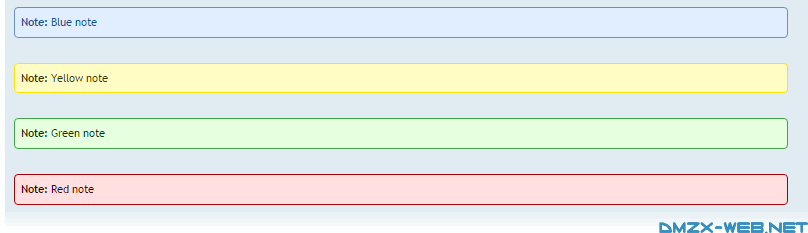
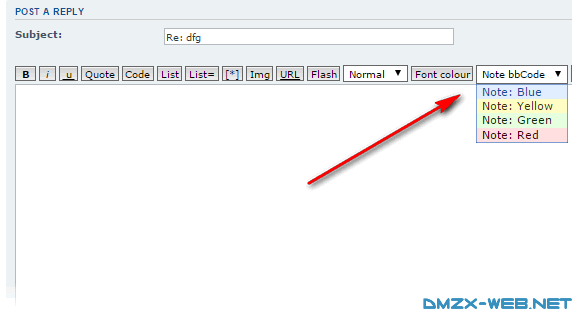
This extension will add a note bbCode selection box in posting template.
[travis]dmzx/Note-Extension[/travis]
Add class
Screenshots: Extension Download: … Installation:
Download the latest release.
Unzip the downloaded release, and change the name of the folder to `note `.
In the `ext ` directory of your phpBB board, create a new directory named `dmzx ` (if it does not already exist).
Copy the `note ` folder to `/ext/dmzx/ ` if done correctly, you'll have the main extension class at (your forum root)/ext/dmzx/note/composer.json
Navigate in the ACP to `Customise -> Manage extensions`
Look for `Note Extension ` under the Disabled Extensions list, and click its `Enable ` link.
TWEagle
Users
Posts: 74Joined: 11 years ago
Post
by TWEagle 10 years ago
This doesn't work in combination with the advanced BB-Code extension??
uruguayito
Donator
Posts: 120Joined: 11 years ago
Post
by uruguayito 10 years ago
I like it....
Question: if posibble make that only Mods and Amins can use it?
Sorry for my bad English.
I'm a latin american man.
Spanish is my language.
dmzx Online
Founder
Posts: 6549Joined: 12 years ago
Post
by dmzx 10 years ago
uruguayito wrote: 10 years ago
I like it....
Question: if posibble make that only Mods and Amins can use it?
Will take a look at it.
martin
Admin
Posts: 5139Joined: 12 years ago
Post
by martin 10 years ago
Got a version of this that now that installs it on mchat too also fixed the going off the chatbox.
77.png
78.png
You do not have the required permissions to view the files attached to this post! Maybe your post count is too low.
nelflucifer
Users
Posts: 70Joined: 10 years ago
Post
by nelflucifer 10 years ago
Thank you! Beautiful! Another would be for the Administration of any colour special =)
RUSSIAN LG
common.zip
You do not have the required permissions to view the files attached to this post! Maybe your post count is too low.
Sniper_E
VIP
Posts: 1161Joined: 11 years ago
Post
by Sniper_E 10 years ago
Code: Select all
<select class="gensmall" name="note" onchange="bbfontstyle('[note=' + this.options[this.selectedIndex].value + '', '[/note]');this.selectedIndex = 0;" title="{L_BBCODE_NOTE_HELP}" style="height: 21px;">Making that
style="height: 21px; lines up with the other buttons. Your 17px was too small.
And I use a css that will kick in the extra margins on mobile size view. This also corrects the drop down selections layout.
Code: Select all
.note-box {
    background-color: #ebebeb;
    border: 1px solid #bbb;
    border-radius: 6px;
    color: #333;
    font-size: 12px;
    padding: 2px 6px;
}
.note-box.blue {
    background-color: #94c4ff;
    border-color: #6b92bd;
    color: #115098;
}

.note-box.yellow {
    background-color: #fffa78;
    border-color: #FFE403;
    color: #333300;
}

.note-box.green {
    background-color: #a7ff93;
    border-color: #43a347;
    color: #043300;
}

.note-box.red {
    background-color: #ff9393;
    border-color: #a30004;
    color: #330002;
}

.note-box.black {
    background-color: #2D2D2D;
    border-color: #000000;
    color: #999999;
}

@media only screen and (max-width: 550px), only screen and (max-device-width: 550px) {
    .note-box {
		width: auto;
		margin-right: 20px;
    }
}

@media only screen and (max-width: 350px), only screen and (max-device-width: 350px) {
    .note-box {
		text-align: justify;
		width: auto;
		margin-right: 30px;
		margin-top: 20px;
    }
}
No is NEVER an Option and NEVER is the only Option when it comes to Giving Up!™
martin
Admin
Posts: 5139Joined: 12 years ago
Post
by martin 10 years ago
Code: Select all
.note-box {
    background-color: #ebebeb;
    border: 1px solid #bbb;
    border-radius: 6px;
    color: #333;
    font-size: 12px;
    padding: 2px 6px;
}
Works well in the forum but not in chat on smaller screens and mobiles this will allow the note to go out side of the chat window also cover chat icons.
Version 1.0.1 this has been fixed as it also adds it to chat.
Sniper_E
VIP
Posts: 1161Joined: 11 years ago
Post
by Sniper_E 10 years ago
martin wrote: 10 years ago
Got a version of this that now that installs it on mchat too also fixed the going off the chatbox.
I don't think mine goes off the chatbox either. Those margins do kick in when they are needed.
And my drop down box in desktop looks better without the margins and radius.
How does your drop down box look?
You do not have the required permissions to view the files attached to this post! Maybe your post count is too low.
martin
Admin
Posts: 5139Joined: 12 years ago
Post
by martin 10 years ago
Mine on mobile
Screenshot_2016-02-02-03-16-26.png
your on mobile
Screenshot_2016-02-02-03-16-47.png
but thats on mobile now shrink pc screen down from a corner mine stays witin chat at on point yours hits the edge of chat.
[ Post made via Android ]
yours on funny size screen
77.png
mine will stay 40 or 60px away from chat edge on any screen size.
You do not have the required permissions to view the files attached to this post! Maybe your post count is too low.
tamarin
Users
Posts: 72Joined: 11 years ago
Post
by tamarin 10 years ago
TWEagle wrote: 10 years ago
this doesn't work in combination with the advanced BB-Code extension??
I have the same problem.
Can you help us please?
Thx
martin
Admin
Posts: 5139Joined: 12 years ago
Post
by martin 10 years ago
If the chat has an event in the right place the note ext will work every where.




 [travis]dmzx/Note-Extension[/travis]