<span class="qte-attr qte_32_33-qte">3.2.x & 3.3.x</span>
dmzx
Founder
Posts: 6549Joined: 12 years ago
Post
by dmzx 11 years ago
Extension Name: Forum Icons
Author: dmzx special thanks to
martin
Extension Description:
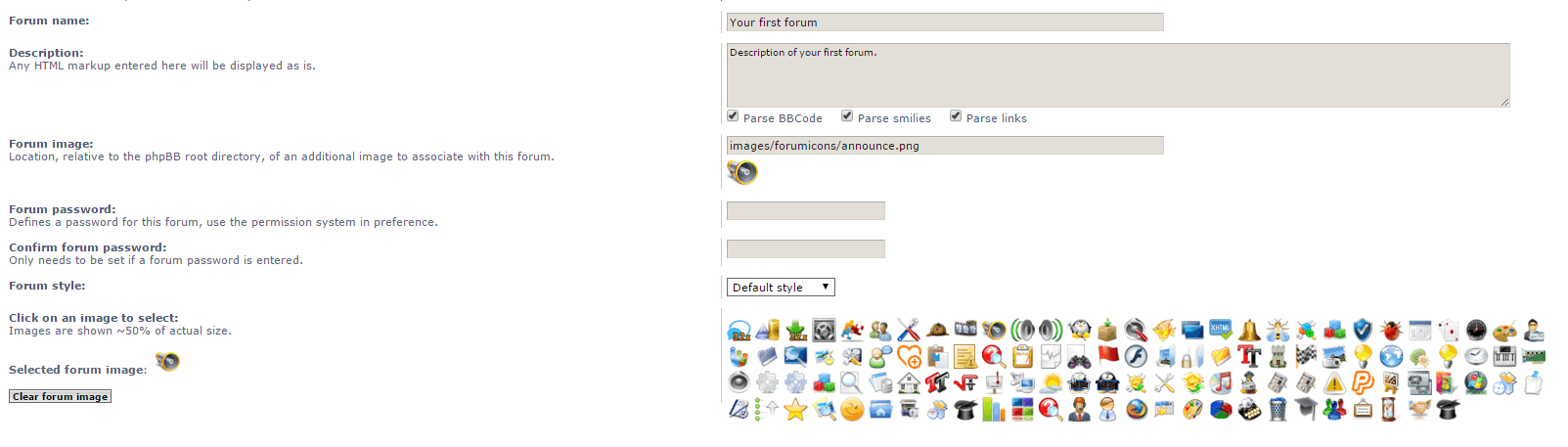
Add forum icons, simply click on the icon to set the forum image.
Note: Upload all forum icons in
images/forumicons
- Twig update.
- Code update.
Changed upload path to
images/forumicons so when disable extension the links are not broken.
Add selected image
Screenshots: Extension Download: … Icon Package: forum_icons_package.zip
Installation:
Download the latest release.
Unzip the downloaded release, and change the name of the folder to `forumicons `.
In the `ext ` directory of your phpBB board, create a new directory named `dmzx ` (if it does not already exist).
Copy the `forumicons ` folder to `/ext/dmzx/ ` if done correctly, you'll have the main extension class at (your forum root)/ext/dmzx/forumicons/composer.json
Navigate in the ACP to `Customise -> Manage extensions`
Look for `Forum Icons ` under the Disabled Extensions list, and click its `Enable ` link. You do not have the required permissions to view the files attached to this post! Maybe your post count is too low.
dmzx
Founder
Posts: 6549Joined: 12 years ago
Post
by dmzx 11 years ago
Update version see Update version 1.0.1 · dmzx/Forum-Icons@5522744 · GitHub for changes.
Solidjeuh
Users
Posts: 348Joined: 11 years ago
Post
by Solidjeuh 11 years ago
Love this extension!
There is just 1 line missing in the language file
( btw, my screen resolution is showing wrong in this topic, I have 32" screen.. 1080p full HD )
Forum voor NL Extensie vertalingen ---> https://www.supportforum.be ----------------------------------------------------------------------------
dmzx
Founder
Posts: 6549Joined: 12 years ago
Post
by dmzx 11 years ago
Solidjeuh wrote: Love this extension!
There is just 1 line missing in the language file
( btw, my screen resolution is showing wrong in this topic, I have 32" screen.. 1080p full HD )
There is no
'FORUM_IMAGE_EXPLAIN' in the code so I can recall, and logout and login again to the forum so the resolution will be adjusted.
Solidjeuh
Users
Posts: 348Joined: 11 years ago
Post
by Solidjeuh 11 years ago
Hmz that's strange, cause the code was in the acp..
Maybe a leftover from phpbb 3.0
Ok resolution works now :)
dmzx
Founder
Posts: 6549Joined: 12 years ago
Post
by dmzx 11 years ago
Solidjeuh wrote: Hmz that's strange, cause the code was in the acp..
Maybe a leftover from phpbb 3.0
Ok resolution works now :)
martin
Admin
Posts: 5139Joined: 12 years ago
Post
by martin 11 years ago
Regards to screen size Purge all sessions needs to be done so every one has to login to reset there cookie.
uruguayito
Donator
Posts: 120Joined: 11 years ago
Post
by uruguayito 11 years ago
Thank you very much
Sorry for my bad English.
I'm a latin american man.
Spanish is my language.
large
Users
Posts: 5Joined: 11 years ago
Post
by large 11 years ago
Excellent extension, thank you for making it.
nelflucifer
Users
Posts: 70Joined: 10 years ago
Post
by nelflucifer 10 years ago
Need help!! I decided to add soy PNG pictures 547 pieces. So here's what happened:
2016-02-03 22_40_08-Редактирование форума — Opera.jpg
what's the problem?
Can be in a file name with a space? For example: "my picture" - right?
You do not have the required permissions to view the files attached to this post! Maybe your post count is too low.
dmzx
Founder
Posts: 6549Joined: 12 years ago
Post
by dmzx 10 years ago
nelflucifer wrote: 10 years ago
Need help!! I decided to add soy PNG pictures 547 pieces. So here's what happened:
2016-02-03 22_40_08-Редактирование форума — Opera.jpg
what's the problem?
Can be in a file name with a space? For example: "my picture" - right?
Check the url of the image and see to what path it will look
nelflucifer
Users
Posts: 70Joined: 10 years ago
Post
by nelflucifer 10 years ago
dmzx wrote: 10 years ago nelflucifer wrote: 10 years ago
Need help!! I decided to add soy PNG pictures 547 pieces. So here's what happened:
2016-02-03 22_40_08-Редактирование форума — Opera.jpg
what's the problem?
Can be in a file name with a space? For example: "my picture" - right?
Check the url of the image and see to what path it will look
The path is the same and where were the original pictures (the ones that go by default with this extension) that is,
Code: Select all
ext/dmzx/forumicons/forum_icons/xxxxxx.png