
<span class="qte-attr qte_31_32-qte">3.1.x & 3.2.x</span>
[phpBB Debug] PHP Warning : in file [ROOT]/vendor/twig/twig/src/Template.php on line 359 : Array to string conversion
Array
iorG19
Translators
Status:
Offline
User theme: Dark
Posts: 60 Joined: Dec 10th, '14, 20:50
Post
by iorG19 » Mar 18th, '17, 15:50
I don't see it in extension tab.
[ Post made via Android ]
[phpBB Debug] PHP Warning : in file [ROOT]/vendor/twig/twig/src/Template.php on line 359 : Array to string conversion
Array
martin
Admin
Status:
Offline
User theme: Dark
Posts: 5113 Joined: Apr 6th, '14, 14:12
Post
by martin » Mar 18th, '17, 16:04
It has no settings thats why.
[phpBB Debug] PHP Warning : in file [ROOT]/vendor/twig/twig/src/Template.php on line 359 : Array to string conversion
Array
iorG19
Translators
Status:
Offline
User theme: Dark
Posts: 60 Joined: Dec 10th, '14, 20:50
Post
by iorG19 » Mar 18th, '17, 16:10
martin wrote: Mar 18th, '17, 16:04
It has no settings thats why.
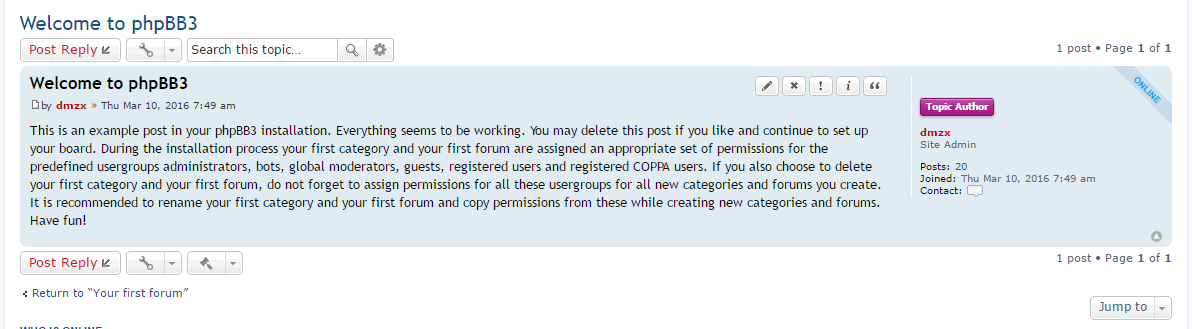
So how can i see it in this cute apareance like here ? ( With color background )
[ Post made via Android ]
[phpBB Debug] PHP Warning : in file [ROOT]/vendor/twig/twig/src/Template.php on line 359 : Array to string conversion
Array
martin
Admin
Status:
Offline
User theme: Dark
Posts: 5113 Joined: Apr 6th, '14, 14:12
Post
by martin » Mar 18th, '17, 16:12
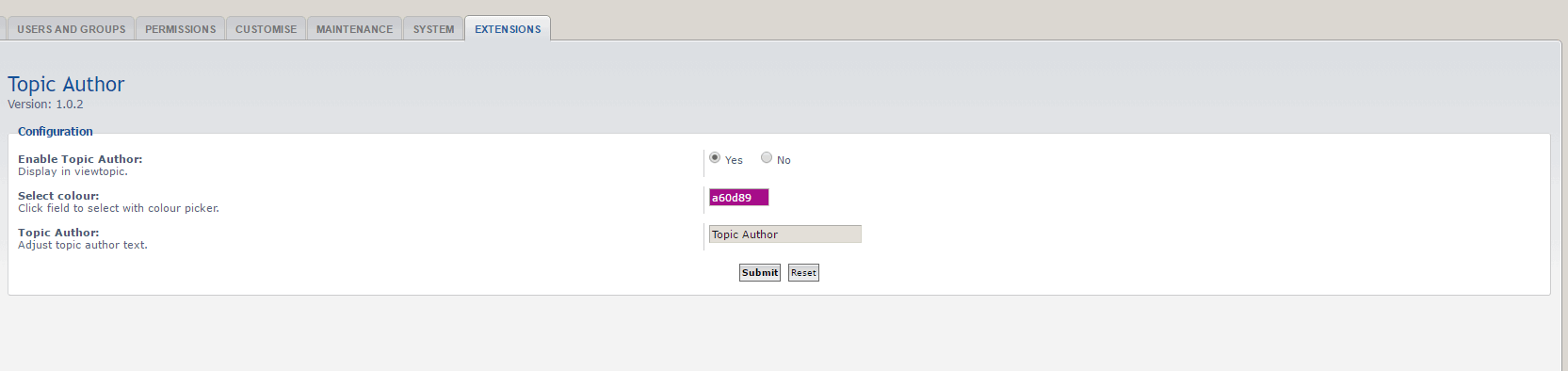
I stand corrected yes it does show under the ext tab and have settings (the first version did not)
[phpBB Debug] PHP Warning : in file [ROOT]/vendor/twig/twig/src/Template.php on line 359 : Array to string conversion
Array
iorG19
Translators
Status:
Offline
User theme: Dark
Posts: 60 Joined: Dec 10th, '14, 20:50
Post
by iorG19 » Mar 18th, '17, 16:20
I just download the current ( 1.0.4 ) and i can't extract files.
[ Post made via Android ]
[phpBB Debug] PHP Warning : in file [ROOT]/vendor/twig/twig/src/Template.php on line 359 : Array to string conversion
Array
martin
Admin
Status:
Offline
User theme: Dark
Posts: 5113 Joined: Apr 6th, '14, 14:12
Post
by martin » Mar 18th, '17, 16:38
Try this one
[phpBB Debug] PHP Warning : in file [ROOT]/vendor/twig/twig/src/Template.php on line 359 : Array to string conversion
Array
dmzx
Founder
Status:
Offline
User theme: Dark
Posts: 6472 Joined: Jan 13th, '14, 20:45
Post
by dmzx » Mar 21st, '17, 20:07
martin wrote: Mar 18th, '17, 16:38 try this one
Changed zip in first post.
[phpBB Debug] PHP Warning : in file [ROOT]/vendor/twig/twig/src/Template.php on line 359 : Array to string conversion
Array
martin
Admin
Status:
Offline
User theme: Dark
Posts: 5113 Joined: Apr 6th, '14, 14:12
Post
by martin » Mar 21st, '17, 20:39
Files was fresh from my acp if you used them.
[phpBB Debug] PHP Warning : in file [ROOT]/vendor/twig/twig/src/Template.php on line 359 : Array to string conversion
Array
John Mates
Users
Status:
Offline
User theme: Dark
Posts: 12 Joined: Mar 29th, '17, 08:04
Post
by John Mates » Mar 29th, '17, 19:20
Great ext
but could I suggest that Topic Authors
who are Guests are ignored from this Ext? otherwise every time a Guest starts a thread then every guest in the Thread (with all their different names) is shown as the Topic Author
which looks a little lame
Capture.GIF
You do not have the required permissions to view the files attached to this post! Maybe your post count is too low.
[phpBB Debug] PHP Warning : in file [ROOT]/vendor/twig/twig/src/Template.php on line 359 : Array to string conversion
Array
dmzx
Founder
Status:
Offline
User theme: Dark
Posts: 6472 Joined: Jan 13th, '14, 20:45
Post
by dmzx » Mar 29th, '17, 19:25
John Mates wrote: Mar 29th, '17, 19:20
great ext
but could I suggest that Topic Authors
who are Guests are ignored from this Ext? otherwise every time a Guest starts a thread then every guest in the Thread (with all their different names) is shown as the Topic Author
which looks a little lame
Capture.GIF
Will look into this!
[phpBB Debug] PHP Warning : in file [ROOT]/vendor/twig/twig/src/Template.php on line 359 : Array to string conversion
Array
Mommike
Users
Status:
Offline
User theme: Dark
Posts: 12 Joined: Mar 24th, '17, 15:05
Post
by Mommike » Apr 2nd, '17, 06:58
Nice extension!
How can I enter little bit longer text to this label? Right now seems 10 characters is the limit.
[phpBB Debug] PHP Warning : in file [ROOT]/vendor/twig/twig/src/Template.php on line 359 : Array to string conversion
Array
dmzx
Founder
Status:
Offline
User theme: Dark
Posts: 6472 Joined: Jan 13th, '14, 20:45
Post
by dmzx » Apr 2nd, '17, 08:25
Mommike wrote: Apr 2nd, '17, 06:58
Nice extension!
How can I enter little bit longer text to this label? Right now seems 10 characters is the limit.
check the maxlength in acp_topicauthor_config.html
Line:
Code: Select all
<input name="topicauthor_text_field" type="text" id="topicauthor_text_field" class="inputbox autowidth" value="{TOPICAUTHOR_TEXT_FIELD}" maxlength="10" />
Make 10 a other value and clear cache. ;)
[phpBB Debug] PHP Warning : in file [ROOT]/vendor/twig/twig/src/Template.php on line 359 : Array to string conversion
Array
Mommike
Users
Status:
Offline
User theme: Dark
Posts: 12 Joined: Mar 24th, '17, 15:05
Post
by Mommike » Apr 2nd, '17, 09:01
Thank worked fine!
One more question. It capitalize every word. How do modify that it showing exactly this way, as I write inside ACP.
[phpBB Debug] PHP Warning : in file [ROOT]/vendor/twig/twig/src/Template.php on line 359 : Array to string conversion
Array
dmzx
Founder
Status:
Offline
User theme: Dark
Posts: 6472 Joined: Jan 13th, '14, 20:45
Post
by dmzx » Apr 2nd, '17, 09:08
Mommike wrote: Apr 2nd, '17, 09:01
Thank worked fine!
One more question. It capitalize every word. How do modify that it showing exactly this way, as I write inside ACP.
This should not be, what did you add in ACP?
[phpBB Debug] PHP Warning : in file [ROOT]/vendor/twig/twig/src/Template.php on line 359 : Array to string conversion
Array
Mommike
Users
Status:
Offline
User theme: Dark
Posts: 12 Joined: Mar 24th, '17, 15:05
Post
by Mommike » Apr 2nd, '17, 09:12
dmzx wrote: Apr 2nd, '17, 09:08
Mommike wrote: Apr 2nd, '17, 09:01
Thank worked fine!
One more question. It capitalize every word. How do modify that it showing exactly this way, as I write inside ACP.
This should not be, what did you add in ACP?
Sorry, my bad. It is under the extensions tab, Topic author - Adjust topic author text. How to modify that it showing the text exactly this way, as I write inside this field.