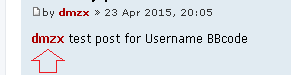

This ext must be made for posting page only. It will not work on index with chat. All tho... I have seen it in chat before.
This ext would have to be modified to work everywhere. Let me see if there is someone in the back that can help you.
[phpBB Debug] PHP Warning: in file [ROOT]/vendor/twig/twig/src/Template.php on line 359: Array to string conversion
Array
Sniper_E wrote: Oct 26th, '19, 02:02
I do not understand what the problem is that you are reporting.
Sniper_E, I have checked everything again and have found that:
When I open a new topic or click on answers in a topic, this extension works.
But if I want to reply about this extension QuickReply Reloaded, so I can't click on your extension.
I hope now that I have described the problem understandable?!
0101.jpg
0202.jpg
You do not have the required permissions to view the files attached to this post! Maybe your post count is too low.
[phpBB Debug] PHP Warning: in file [ROOT]/vendor/twig/twig/src/Template.php on line 359: Array to string conversion
Array
I'm doing some work on my site so it's down for testing this.
One thought is to make the usernames available on more than just the posting page. Test this out.
static public function getSubscribedEvents()
{
return array(
'core.user_setup' => 'load_language_on_setup',
'core.modify_posting_auth' => 'modify_posting_auth',
);
}
public function modify_posting_auth($event)
static public function getSubscribedEvents()
{
return array(
'core.user_setup' => 'load_language_on_setup',
'core.page_header_after' => 'page_header_after',
);
}
public function page_header_after($event)
Clear server cache, test and report back in please.
[phpBB Debug] PHP Warning: in file [ROOT]/vendor/twig/twig/src/Template.php on line 359: Array to string conversion
Array
Sniper_E wrote: Nov 15th, '19, 04:17
I'm doing some work on my site so it's down for testing this.
One thought is to make the usernames available on more than just the posting page. Test this out.
static public function getSubscribedEvents()
{
return array(
'core.user_setup' => 'load_language_on_setup',
'core.modify_posting_auth' => 'modify_posting_auth',
);
}
public function modify_posting_auth($event)
static public function getSubscribedEvents()
{
return array(
'core.user_setup' => 'load_language_on_setup',
'core.page_header_after' => 'page_header_after',
);
}
public function page_header_after($event)
Clear server cache, test and report back in please.
- As I already wrote, I have the QuickReply Reloaded extension installed.
After your change I can now click on the names and select, but the name does not appear in the post. (see picture 001)
001.jpg
And if I reply in the normal way (without QuickReply Reloaded), the name will appear. (see picture 002)
002.jpg
You do not have the required permissions to view the files attached to this post! Maybe your post count is too low.